Sales Pipeline & Forecast App on Snowflake: Beyond the CRM
A sales pipeline and forecast app on Snowflake goes beyond the CRM: forecast with ML on full history, interrogate deal quality, and act on live data.


Your CRM holds the pipeline, but it can’t tell you why a deal is really in the forecast — or run a serious model on years of history. A sales pipeline and forecast app on Snowflake can. This guide covers why CRM forecasting falls short, what a forecast app on Snowflake adds, and how teams interrogate the pipeline instead of just rolling it up.
Every sales leader knows the quarterly ritual: the CRM produces a forecast number, and nobody fully believes it. It’s a roll-up of deal stages a rep set by feel, weighted by probabilities nobody calibrated, with no memory of how similar deals actually played out last year. When someone asks “why is this number what it is?”, the honest answer is a shrug.
The problem isn’t the CRM — it’s asking the CRM to do something it was never built for. A CRM is a system of record for the pipeline; it captures deals, stages, and owners. It is not an analytics or forecasting engine, and it can’t reach the historical, product, and behavioral data that actually predict whether a deal closes.
A sales pipeline and forecast app on Snowflake is built for exactly that gap — on the warehouse where all of that data already lives.
This guide explains what it is and what it lets you do that the CRM can’t.
TL;DR
A sales pipeline and forecast app on Snowflake is a data app built on your CRM and revenue data in Snowflake — to forecast the pipeline with real models and interrogate deal quality, not just roll up rep guesses.
It does what the CRM can’t: forecast on full history with machine learning, join pipeline to product, billing, and engagement data, and explain why a deal is likely to close, slip, or die.
Because it runs on Snowflake, it works on live, unified data with one source of truth, can run a Snowpark forecast where the data sits, and lets reps and ops act — writing adjustments back under governance.
Why the CRM forecast falls short
CRM forecasting isn’t wrong so much as shallow. A few structural limits explain why teams stop trusting it:
- It’s built on subjective stages. The forecast is a roll-up of deal stages entered by sales reps, often by gut. Garbage-in math produces a confident number with no real basis.
- It has no historical depth. The CRM knows today’s pipeline; it doesn’t learn from years of historical sales data about how deals with these characteristics actually behaved.
- It can’t see outside itself. Product usage, billing history, marketing engagement, and market data all signal whether a deal closes — and none of it lives in the CRM.
- It can’t be interrogated. You can read the forecast number, but you can’t easily ask which deals are likely to remain in the forecast versus get pushed or closed, or why a particular deal is at risk. The CRM shows the what, never the why.
What is a sales pipeline and forecast app on Snowflake?
It’s a data app — an application that lets you both analyze and act — built on your sales and revenue data in Snowflake. The CRM’s pipeline data flows into Snowflake, where it can be joined with historical deals, product usage, billing, and engagement data, and then a forecast app sits on top of that unified picture.
Two things make it different from a CRM dashboard.
First, it forecasts with real models — a machine-learning forecast trained on historical pipeline data, not a weighted-stage roll-up.
Second, it lets the team act: a rep or ops user can adjust an assumption, re-grade a deal, or correct data, and the change is written back to Snowflake under governance. It’s the analytics-and-action layer the CRM can’t be, sitting on the data the CRM produces.
Why build it on Snowflake?
The case for Snowflake here isn’t abstract — it’s that the data and the compute the forecast needs are already there:
- The data already lands there. CRM, product, billing, and marketing data converge in Snowflake, so the forecast can draw on the whole revenue picture instead of one system’s slice.
- One source of truth. Defining pipeline and revenue metrics once on the warehouse gives a single source of truth, so the forecast and the dashboards finally agree.
- Forecast where the data sits. A Snowpark machine-learning model can run the forecast inside Snowflake, on the live data, without copying it out to a separate data-science environment.
- Scale without extracts. Snowflake handles billions of rows of historical sales data, so the model trains on real volume and the app stays real-time — no nightly export.
- Governed, with secure sharing. Governance, row-level security, and secure data sharing are inherited from Snowflake, so the revenue data stays trustworthy as it feeds the board.
What it lets you do that the CRM can’t
This is where a forecast app earns its place. Built on the full data in Snowflake, it answers the questions the CRM forecast can’t:
Grade the forecast at the deal level
Instead of one blended number, the app can flag which deals are likely to remain in the forecast versus those likely to be pushed or closed — and surface the characteristics of deals that historically slipped. The team sees not just the number but the deals driving it, and can allocate resources to the ones that matter.
Explain why a deal is at risk
By joining pipeline to engagement and product-usage data, the app can offer insight into why particular deals are at risk — a stalled champion, dropping usage, a milestone missed. It helps the team understand whether a deal hit its key milestones, rather than trusting a stage label.
Forecast with machine learning on history
A time-series forecasting model, trained on historical sales data, can account for seasonality and the natural fluctuation of the sales cycle — producing a prediction grounded in how deals actually behaved, not how a rep feels this week. This is the same Snowpark forecasting pattern finance uses for budgeting and forecasting on Snowflake, pointed at the pipeline.
Act on the forecast, in place
Because it’s a data app, the forecast isn’t read-only. Adjust an assumption, override a deal’s grade, or flag a renewal, and it’s written back to Snowflake — governed and audited. The forecast becomes a workflow the team runs, not a report they receive.
What this looks like in practice
No customer logos here — just live, explorable apps that show the building blocks of a pipeline and forecast app:
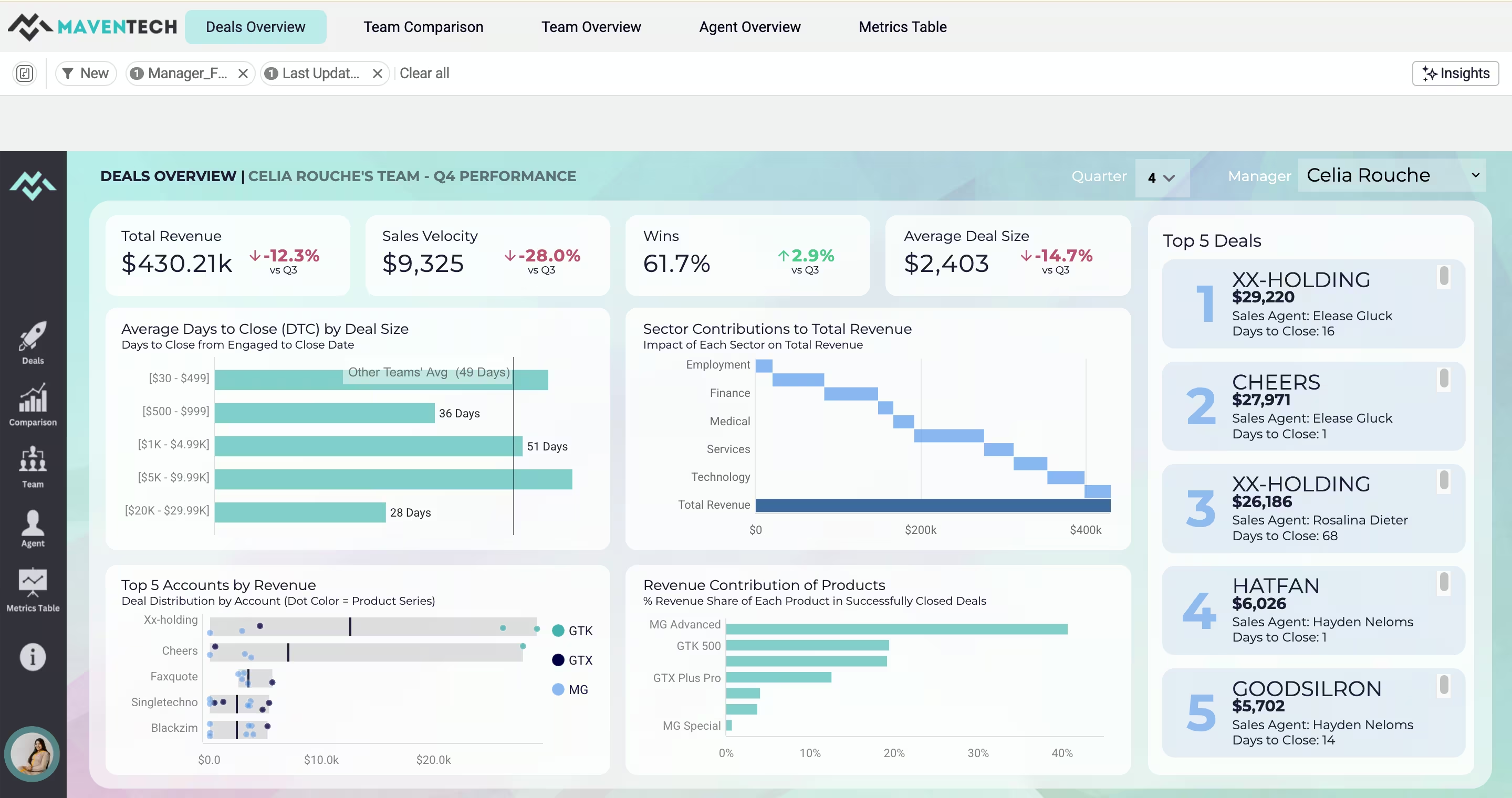
CRM sales performance. The Maventech CRM Sales Performance demo turns raw CRM data into a live view of deal sizes, top accounts, revenue share, and team performance — the pipeline analytics foundation.
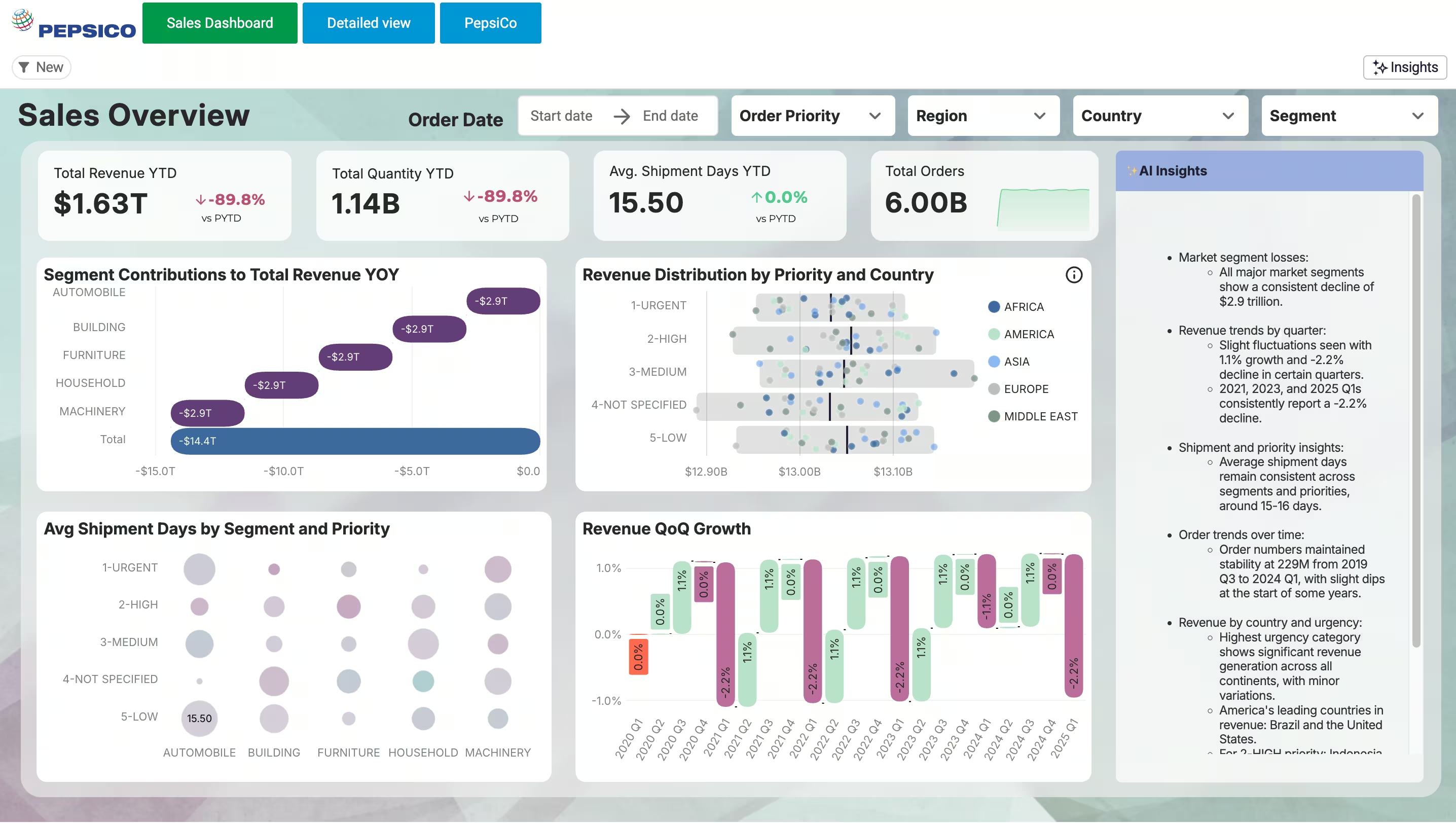
Forecasting at scale. The PepsiCo Sales Overview demo drills into 6 billion rows of sales data live from Snowflake with no extracts — the volume a real forecast trains on.
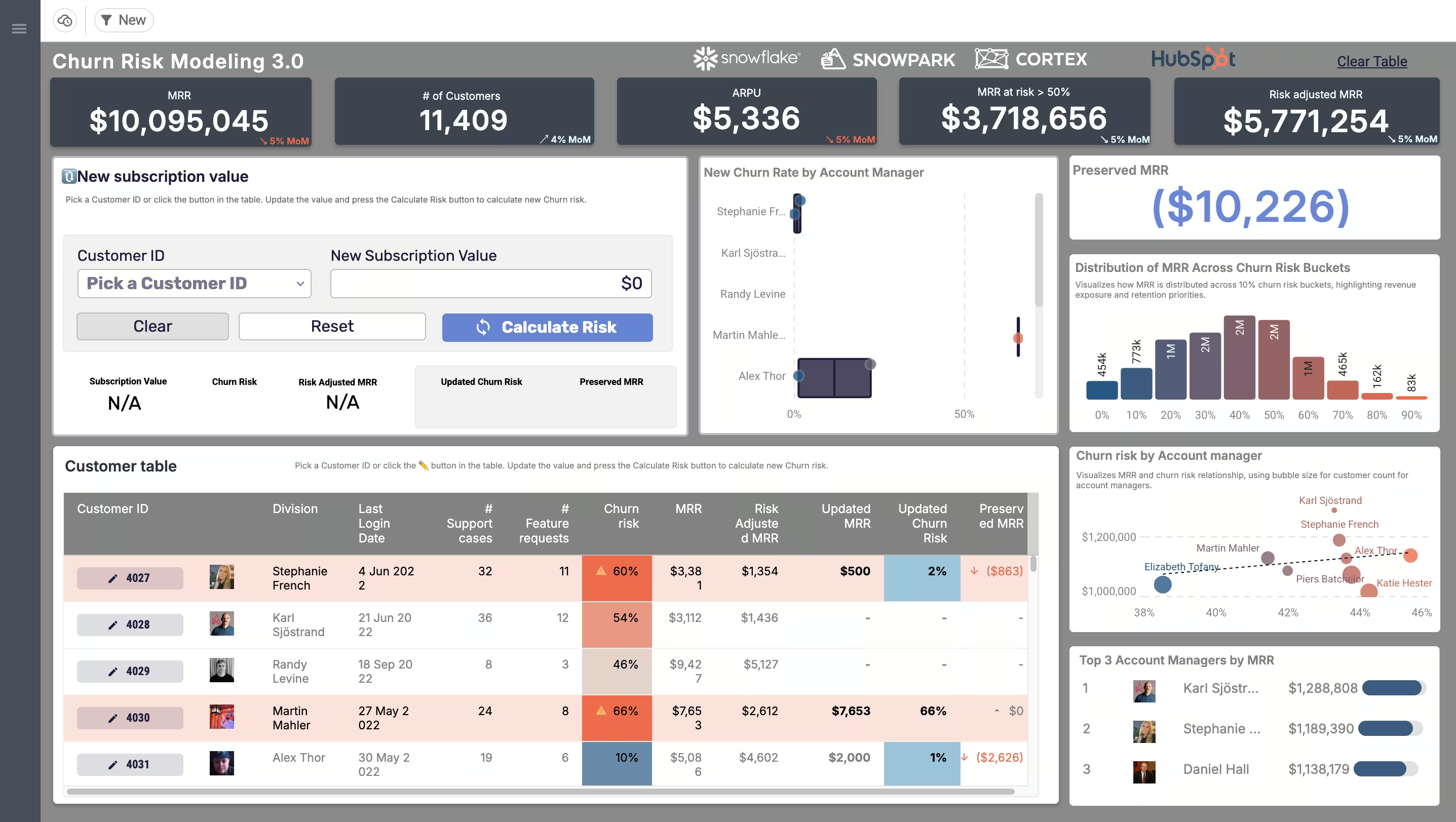
The model-and-act pattern. The Price Modeling & Churn Risk demo lets you change an input and instantly model an outcome with Snowpark — the same change-an-input, get-a-prediction, take-an-action loop a forecast app runs on.
The shift is from a number you receive to a forecast you can question. A CRM dashboard shows you the pipeline and a forecast total; a data app on Snowflake lets you ask why, test a scenario, and act on the answer. One is a view; the other is a workflow — which is the whole difference between a dashboard and a data app.
None of this replaces the CRM. The CRM stays the system where deals are worked; the forecast app is the analytics-and-action layer on top of the revenue data it generates — part of the broader move to run revenue operations as governed data apps rather than a pile of disconnected dashboards.
How to get started
- Get the CRM data into Snowflake. Most teams already sync it; confirm pipeline, history, and the related product or billing data are landing and defined consistently.
- Start with pipeline analytics, then forecast. Build the deal-level pipeline view first — it delivers value immediately — then layer the ML forecast on top.
- Build in action from the start. Design for writeback so reps and ops can adjust and correct, not just look — the value is in the verbs.
- Govern it. Keep it on governed data with role-based controls and an audit trail, so the forecast can feed the board with confidence.
Key takeaways
- A sales pipeline and forecast app on Snowflake forecasts the pipeline with real models and interrogates deal quality — not just a roll-up of rep guesses.
- CRM forecasting falls short because it’s subjective, has no historical depth, can’t see outside itself, and can’t be interrogated.
- On Snowflake, the forecast draws on unified data, runs an ML model where the data sits (Snowpark), scales to billions of rows, and stays governed.
- It answers what the CRM can’t: which deals will hold vs. slip, why a deal is at risk, and a history-based prediction — with the ability to act on it.
- It complements the CRM; it doesn’t replace it — the analytics-and-action layer on the revenue data the CRM produces.
Frequently asked questions
What is a sales pipeline and forecast app on Snowflake?
It's a data app built on your CRM and revenue data in Snowflake that forecasts the pipeline with real models and lets teams interrogate and act on it — rather than just rolling up subjective deal stages from the CRM. It joins pipeline data with history, product usage, and billing to predict and explain outcomes.
Why not just forecast in the CRM?
The CRM is a system of record for the pipeline, not a forecasting engine. Its forecast is a weighted roll-up of stages reps set by feel, with no historical depth and no access to the product, billing, or engagement data that actually predict whether a deal closes. A forecast app on Snowflake adds the models and the data the CRM lacks.
How does Snowflake improve sales forecasting?
Snowflake is where CRM, product, billing, and marketing data converge, so the forecast can draw on the whole revenue picture with one source of truth. A Snowpark machine-learning model can run the forecast on live data inside Snowflake, at the scale of billions of rows, without copying data to a separate environment.
Does it use machine learning?
Yes — a time-series model trained on historical sales data can account for seasonality and sales-cycle fluctuation to produce a prediction grounded in how deals actually behaved. Running it in Snowpark means the model trains and runs where the data already lives, rather than in a separate data-science stack.
Does a forecast app replace the CRM?
No. The CRM remains the system where deals are worked and recorded. The forecast app is the analytics-and-action layer on top of the revenue data the CRM produces — it interrogates and forecasts the pipeline, and writes adjustments back, but it doesn't replace the CRM's day-to-day workflow.
What can it tell me that my CRM forecast can't?
Which deals are likely to remain in the forecast versus be pushed or closed, the characteristics of deals that historically slipped, and why a particular deal is at risk — by joining pipeline to engagement and usage data. It turns one blended number into deal-level insight you can act on.
Forecast the pipeline you can actually interrogate
Astrato is the warehouse-native BI platform revenue teams use to build pipeline and forecast apps directly on Snowflake — unified CRM and revenue data, ML forecasting with Snowpark, deal-level insight, and writeback so the team acts on the forecast instead of just reading it. Explore the demo apps — from CRM sales performance to no-code Snowpark modeling — or book a demo to see your pipeline forecast as a workflow, not a roll-up.
Ready to experience next-gen analytics?
See how Astrato runs natively in your warehouse.