What Is a Data Analytics Workflow? (And Why It Shouldn’t End at a Dashboard)
A data analytics workflow turns raw data into decisions. Learn the stages, see best practices, and why the most effective workflows don't end at a dashboard.

A data analytics workflow is the structured path that turns raw data into a decision. This guide walks through every stage — collection, cleaning, preparation, exploration, analysis, visualization — the best practices that keep it reliable, and the one upgrade that separates a workflow that informs from one that actually gets something done.
An analyst spends three days on it. Pulls the data from four systems, cleans it, reconciles the numbers, builds the model, ships a clean dashboard with the answer in it. The answer is right. Everyone nods in the meeting.
And then… nothing happens.
The insight sits on a screen while the actual decision waits on a spreadsheet, an email thread, and an approval that takes a week. The data analytics workflow did its job — right up until the point where the job mattered.
That last gap is the part most definitions skip. A data analytics workflow is usually described as the steps that turn raw data into insight. That’s correct, and we’ll walk through every one of those steps below.
But a workflow that ends at insight is only half a workflow.
This guide covers the full picture: the classic stages of data analysis, the best practices that make them reliable, and the shift from an analytics workflow that informs to an operational workflow that acts.
TL;DR
A data analytics workflow is a structured, repeatable process for turning raw data into decisions — typically collection, cleaning, preparation, exploration, analysis, and visualization.
A well-defined data analysis workflow matters because it makes results reproducible, protects data quality, and lets a team scale analysis across more people and more data sources without losing trust in the numbers.
The limitation of the traditional workflow is that it stops at a chart. An operational data analytics workflow closes the loop — letting people act on the insight, with the action written back to the warehouse — which is what turns analysis into outcomes.
What is a data analytics workflow?
A data analytics workflow is the structured sequence of steps a team follows to move from raw data to a decision. It is the actual workflow of data analysis: where the data comes from, how it gets cleaned and prepared, how it is explored and analyzed, and how the result is communicated so someone can act on it.
The word that matters is structured. Anyone can open a dataset and poke around. A workflow is what makes data analysis repeatable — so the same question asked next quarter follows the same path and produces a comparable answer, and so the work of one of your data analysts can be picked up by another.
A structured data analysis workflow is the difference between analysis as a craft that lives in one person’s head and analysis as a process a data team can run, audit, and improve.
The same backbone applies whether you are doing lightweight reporting or heavy data science. The tools differ — a data scientist training a model and an analyst building a board report use different analysis tools — but the underlying data analysis process rhymes: get the right data, make it trustworthy, understand it, draw a conclusion, and hand that conclusion to someone who can use it.
Most versions of the workflow involve six stages. Real projects loop back — exploration sends you back for more data, analysis exposes a quality problem — but the sequence below is the spine of nearly every data analysis workflow.
1. Data collection
Everything starts with gathering the necessary data. In practice this means pulling data from multiple systems — product databases, CRMs, finance tools, event streams — into one place you can work with. Good data collection is deliberate about data sources: which system is authoritative for each field, whether you need historical data or real-time data, and how much data volume you are realistically going to process. Increasingly this step is automated — pipelines land new data continuously rather than someone exporting CSVs by hand.
2. Data cleaning
Raw data is messy: duplicates, missing values, inconsistent formats, the same customer spelled three ways. Data cleaning is the unglamorous, decisive stage where you fix that — because every downstream conclusion inherits the quality of the data underneath it. This is where ensuring data quality and data accuracy actually happens, and skipping it is how teams end up confidently wrong. The goal is high-quality data you can trust enough to bet a decision on.
3. Data preparation and integration
Clean data still has to be shaped for analysis: joined across sources, aggregated, enriched, and modeled into the structures your questions need. This is data preparation and data integration — combining data from multiple systems into a coherent whole. In a modern stack this work lands in a data warehouse or data lake, fed by data pipelines that the data engineering team maintains. The output is a reliable, queryable data infrastructure — the foundation the rest of the workflow stands on.
4. Exploratory data analysis
Before you answer the question, you get to know the data. Exploratory data analysis (EDA) is where you explore data to find its shape — distributions, outliers, relationships, surprises. This is the stage that turns a pile of relevant data into a set of hypotheses worth testing. Good data exploration prevents the classic mistake of running a sophisticated analysis on data you never actually looked at.
5. Analysis and modeling
Now the core work: analyzing data to answer the question. Depending on the goal, that ranges from a straightforward aggregation to statistical testing to a machine-learning model trained on large volumes of data. This is where complex data and big data techniques earn their keep, and where the line between an analyst and a data scientist blurs. Whatever the method, the aim is the same — use the data to answer the actual business question, not just to produce a number.
6. Visualization and communication
An answer nobody understands changes nothing. Data visualization translates the analysis into something a decision-maker can read at a glance — the chart, the dashboard, the one number with context around it. This is the stage most people picture when they think “analytics,” and for decades it was the finish line: present the data, and the workflow is done.
Except, as the analyst at the top of this article discovered, it isn’t.
Where the traditional data analytics workflow stalls
Notice where every stage above ends: at a screen. Collection, cleaning, preparation, exploration, analysis, visualization — the entire workflow of data analysis is built to produce an artifact you look at. The implicit assumption is that someone else, somewhere else, will take that artifact and act.
That assumption is where insight goes to die. The decision lives in a different tool than the analysis. To act on the dashboard, someone exports it, rebuilds part of it in a spreadsheet, emails it around, and files a request. By the time the action happens, the real-time data that made the insight urgent is a week old. The workflow technically succeeded and the outcome still didn’t change.
This is not a failure of the analysis. It is a structural limit of a workflow that isn’t designed to do anything but inform. For most of analytics’ history that limit was unavoidable — the tools could read data but not write it. That constraint is the thing that has changed.
An operational workflow is what you get when the data analytics workflow doesn’t stop at visualization — when the same governed surface that shows the insight also lets you act on it, and writes that action straight back to the warehouse. The analyst doesn’t hand off a chart; the person who owns the decision makes it in place, and the record lands in the data warehouse with full audit, under the same governance as every other number.
Concretely, this is the difference between a dashboard and a data app — the read-and-write successor to the read-only dashboard. (We cover the distinction in depth in our guide to what a data app is.) The analytics workflow still runs underneath — collection, cleaning, preparation, all of it — but the final stage flips from “present the data” to “act on the data, and capture the action as new data.” The loop closes.
This is not theoretical. The pattern is already running in production:
- The close, as an operational workflow. At GlobalData, roughly 250 accountants used to spend four to five person-weeks a month copying exports into spreadsheets. Rebuilt as an operational workflow on the warehouse, a hierarchy change now propagates in about 15 minutes — and the board still gets the same template.
- Budgeting, as an operational workflow. A global music publisher (PeerMusic) moved budgeting across 40 entities into a single governed workflow in six weeks — inputs validated and approvals routed in place, instead of chased across linked workbooks.
- Master data, as an operational workflow. Ceres Pharma, after 14 acquisitions, let business experts map each product to one corporate code and write it back — turning a multi-year data-quality project into a workflow business users run themselves.
- Scenario modelling, as an operational workflow. Elbiil’s customers enter a hypothetical and see the result against live data instantly, because the workflow captures the input and re-runs — a two-person team didn’t have to build a scenario engine.
In every case the underlying data analysis is the same work it always was. What changed is that the workflow no longer ends at a chart — it ends at a decision, recorded.
Best practices for an effective data analytics workflow
Whether your workflow stops at insight or closes the loop, the same practices separate one you can trust from one you can’t. The best practices in data analytics are mostly about discipline, not tooling:
- Treat data quality as a gate, not an afterthought. Build cleaning and validation into the workflow so bad data is caught early, not discovered in a board meeting. An effective data analysis workflow assumes the data is wrong until it has been checked.
- Work from a single source of truth. When analysis runs directly on a governed data warehouse rather than on extracted copies, everyone is working from the same numbers — and data accuracy stops being a debate.
- Define metrics once. A shared semantic layer means “revenue” means the same thing in every analysis. Without it, two correct workflows produce two different answers.
- Make it reproducible. A structured data analysis workflow that anyone on the data team can re-run beats a brilliant analysis only its author can reproduce.
- Automate the repetitive stages. Collection and preparation are where automated data pipelines pay off, freeing analysts to spend time on the analysis itself.
- Govern the whole workflow, not just the data. If the workflow now includes actions, data governance has to cover who can write, not only who can read.
What an effective data analytics workflow needs
Pulling the practices together, an effective, operational data analytics workflow rests on three things. First, a trustworthy data infrastructure — a cloud data warehouse that holds governed, high-quality data as the single source of truth. Second, a layer that lets people work with that data directly, in real time, without exporting it — so analysis runs on live data rather than stale copies. Third, the ability to write back, so the workflow can end in an action that is captured and governed like any other data asset.
Get those three right and the workflow stops being a relay race that drops the baton at the dashboard. It becomes a single, governed loop — from raw data to decision to recorded outcome — that a data team can run at scale.
Frequently asked questions
What is a data analytics workflow?
It is the structured sequence of steps that turns raw data into a decision — typically data collection, cleaning, preparation, exploratory analysis, analysis or modeling, and visualization. The point of treating it as a workflow is repeatability: the same question follows the same path and produces a comparable, trustworthy answer.
What are the stages of a data analysis workflow?
Six are standard: (1) collect data from your sources, (2) clean it, (3) prepare and integrate it, (4) explore it, (5) analyze or model it, and (6) visualize and communicate the result. Real projects loop between stages rather than moving in a straight line.
Why is a well-defined data analytics workflow important?
Because it protects data quality, makes analysis reproducible across a team, and scales. Without a structured workflow, results depend on whoever happened to build them, and the same question can produce different answers depending on who asks it.
What is the difference between a data analytics workflow and an operational workflow?
A traditional analytics workflow ends at insight — a chart or dashboard someone looks at. An operational workflow extends it: the same governed surface lets people act on the insight, and the action is written back to the warehouse. One informs; the other gets something done.
What tools do you need for an effective data analytics workflow?
At minimum, a governed cloud data warehouse as the source of truth, a way to query and analyze that data live rather than on extracts, and — for an operational workflow — the ability to write actions back to the warehouse under the same governance. A shared semantic layer keeps metric definitions consistent across the whole workflow.
How do you ensure data quality throughout the workflow?
Treat quality as a gate rather than a final check: validate at collection, clean before preparation, and work from a single governed source so there are no divergent copies to reconcile. Reproducibility and governance do the rest — if anyone can re-run the workflow, errors surface fast.
Close the loop on your data analytics workflow
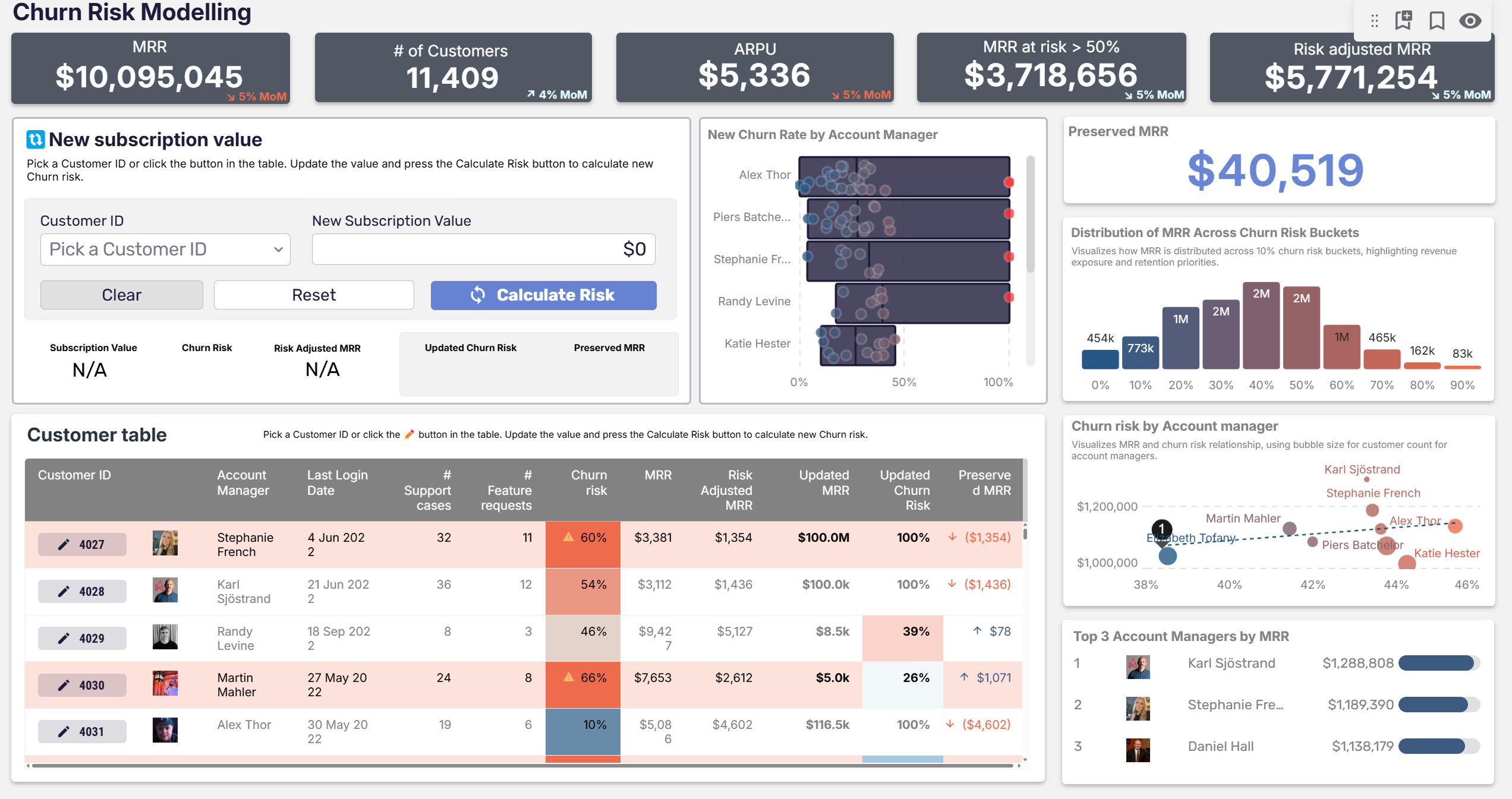
Astrato is the warehouse-native BI platform that runs analytics directly on Snowflake, BigQuery, and Databricks — and lets your workflow end in an action, not just a chart.
Book a demo or start a free trial to see live-query analysis and governed writeback turn a read-only workflow into an operational one on your own data.
Ready to experience next-gen analytics?
See how Astrato runs natively in your warehouse.