Budgeting & Forecasting as a Data App on Snowflake
How finance teams build a budgeting and forecasting data app on Snowflake — governed inputs, writeback to Snowflake tables, and Snowpark/Cortex forecasting, all on live data.


Your actuals already live in Snowflake. Your budget lives in a spreadsheet. This guide shows how finance teams close that gap — building budgeting and forecasting as a governed data app on Snowflake, where inputs, approvals, and forecasts run on the same live data as everything else.
Here’s the contradiction at the heart of most finance teams’ planning process. The actuals — every transaction, every cost center, every line of ERP data — sit in Snowflake, governed and current.
The budget they’re measured against sits in a spreadsheet on someone’s laptop. Two sources of truth that have to be reconciled by hand, every month-end, forever.
A budgeting and forecasting data app on Snowflake collapses that gap. Instead of exporting actuals out to plan and importing the plan back to report, the entire workflow — entering the budget, routing approvals, generating the forecast, explaining the variance — runs as an application directly on Snowflake.
The plan and the actuals finally live in the same place.
This guide explains what that looks like, how it’s built, and why “on Snowflake” is the part that makes it work.
TL;DR
A budgeting and forecasting data app on Snowflake runs the whole planning workflow — inputs, approvals, forecasts, variance — directly on your Snowflake data, instead of in a disconnected spreadsheet.
Budget inputs are written back to Snowflake tables under RBAC, so the plan is governed exactly like the actuals — with Time Travel giving a full audit of every change.
Forecasts run where the data is: Snowpark for time-series forecasting, Cortex for AI variance explanations — no data movement, no extract, no second copy to reconcile.
What is a budgeting and forecasting data app on Snowflake?
It’s a data application — an interactive, read-and-write interface — that runs the budgeting and forecasting workflow on top of Snowflake.
Where a dashboard would only show you budget-vs-actuals, a data app lets finance do the planning: enter figures, submit them for approval, run a forecast, and write the result back — all against live Snowflake data, with no export step.
The distinction from traditional planning tools is where the data lives. A standalone SaaS planning tool keeps its own copy of your numbers, which then drifts from Snowflake and has to be synced.
A data app built on Snowflake has no separate store — the budget is Snowflake data, written to Snowflake tables, governed by the same RBAC and visible to the same SQL as your actuals. One data cloud, one source of truth, for both the plan and the performance against it.
Why build it on Snowflake specifically?
“On Snowflake” isn’t incidental — it’s what makes the architecture work. Four reasons finance and data engineering teams converge on it:
- The actuals are already there. Most enterprises already centralize ERP, SAP, and operational data into Snowflake. Building the budget there too means plan and actuals share one schema — no data movement, no integration to maintain.
- Governance comes for free. Row-level security, masking, and access control are enforced by Snowflake and passed straight through, so a budgeting app inherits enterprise governance instead of re-implementing it. Finance writes back under the same RBAC as every other Snowflake object.
- It scales to the whole enterprise. Consolidating a budget across every business unit and cost center means joining large datasets. Snowflake’s engine handles consolidated financial planning across the org without the workbook grinding to a halt.
- The compute is already there. Forecasting and AI run in Snowflake — Snowpark and Cortex — so you model on the data where it sits, consumption-based, without spinning up separate data infrastructure.
A budgeting and forecasting data app on Snowflake has four moving parts. Here’s how they fit together.
1. Live actuals from Snowflake
The app reads actuals directly from Snowflake — ERP, GL, and operational data already landed there by your data pipelines. No extract: the budget-vs-actuals view is always current, querying live Snowflake tables rather than a nightly copy.
2. Budget inputs via writeback
This is the part a dashboard can’t do. Planners enter budget figures into the app, and those inputs are written back to Snowflake tables under RBAC. The budget becomes Snowflake data like everything else — queryable in SQL, joinable to actuals, and governed. With Time Travel, every change is auditable: who changed what, when, and what it was before.
3. Forecasts with Snowpark
Forecasting runs where the data is. A Snowpark stored procedure can apply a model — for example, time-series forecasting that projects revenue or demand from historical data — and write the result straight back to Snowflake, so a business user gets an advanced forecast from a simple input form, with no Python notebook to maintain.
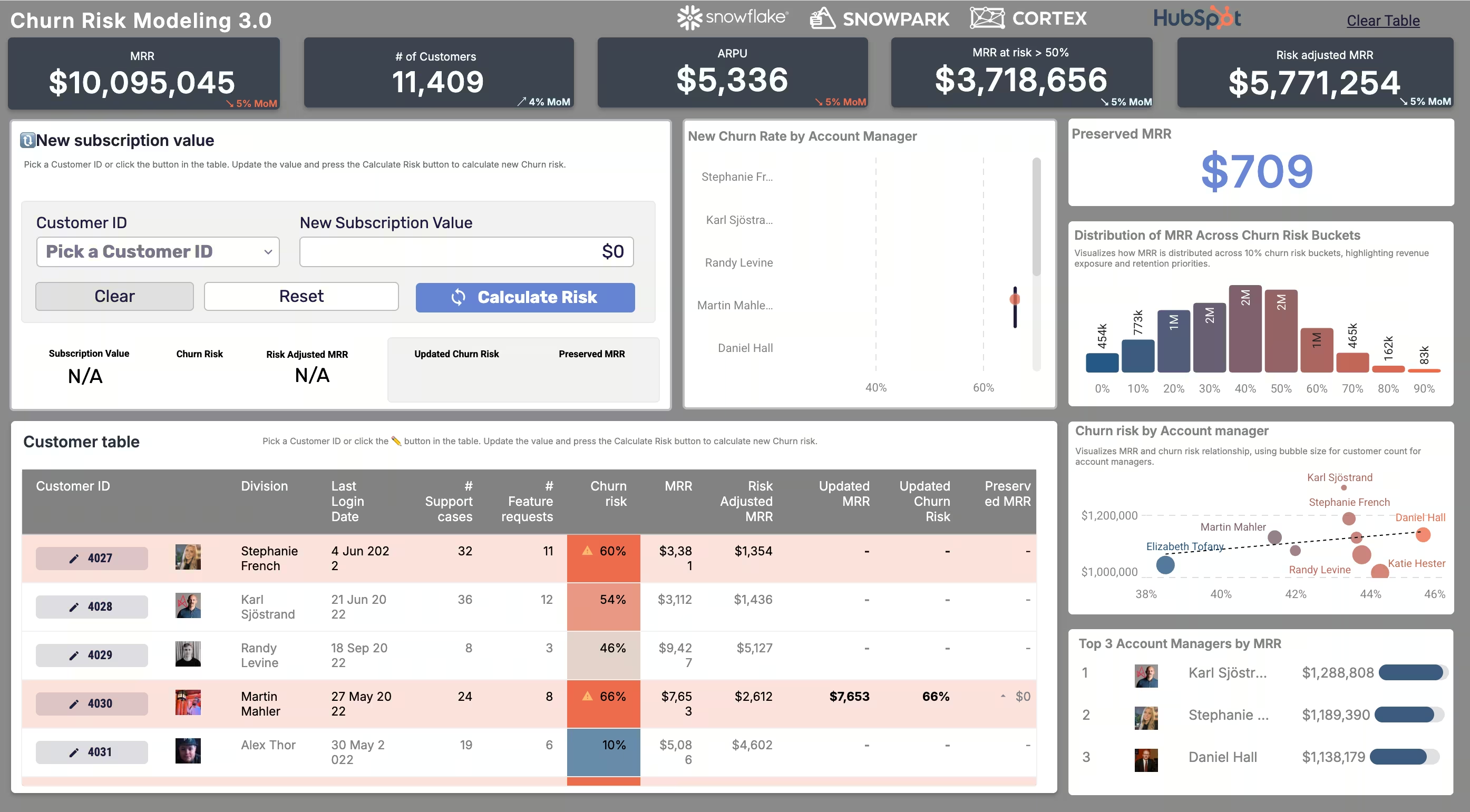
This is the same Snowpark pattern Astrato already uses in production: in the Price Modeling & Churn Risk demo app, a user adjusts a customer's recurring revenue and a Snowpark model returns the predicted churn risk instantly.
Swap the model and the inputs, and the identical mechanism — configure variables, run the procedure, write back — drives a rolling financial forecast.
4. Variance and AI explanations with Cortex
Once plan and actuals are in one place, variance analysis is a live query, not a reconciliation exercise. And because Cortex runs inside Snowflake, an AI-powered layer can draft variance explanations in plain language — “margin is down because of X” — grounded in the same governed numbers. AI brought to the data, not the data shipped to the AI.
What it looks like in practice
Astrato is a purpose-built, validated Snowflake partner, and the finance use cases are live in the demo gallery:
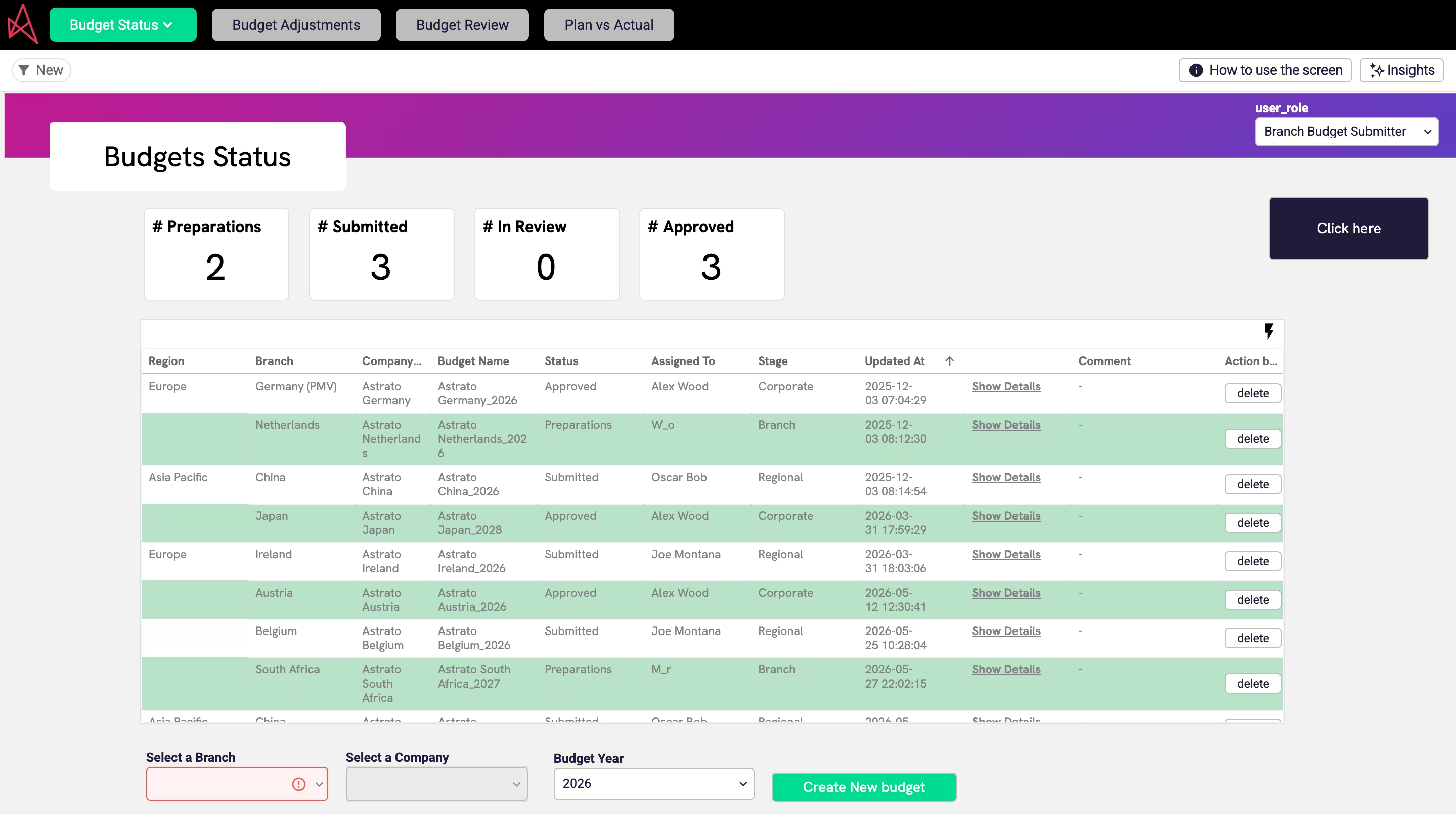
- Budgeting: Track budgets against actuals in real time, monitor utilisation, and break down by company, category, and period — built for finance teams moving beyond spreadsheets into interactive, self-service planning.
- Price Modeling & Churn Risk: Adjust a customer's recurring revenue and a Snowpark model returns the churn-risk impact instantly — the same no-code, write-back-to-Snowflake mechanism that powers a financial forecast.
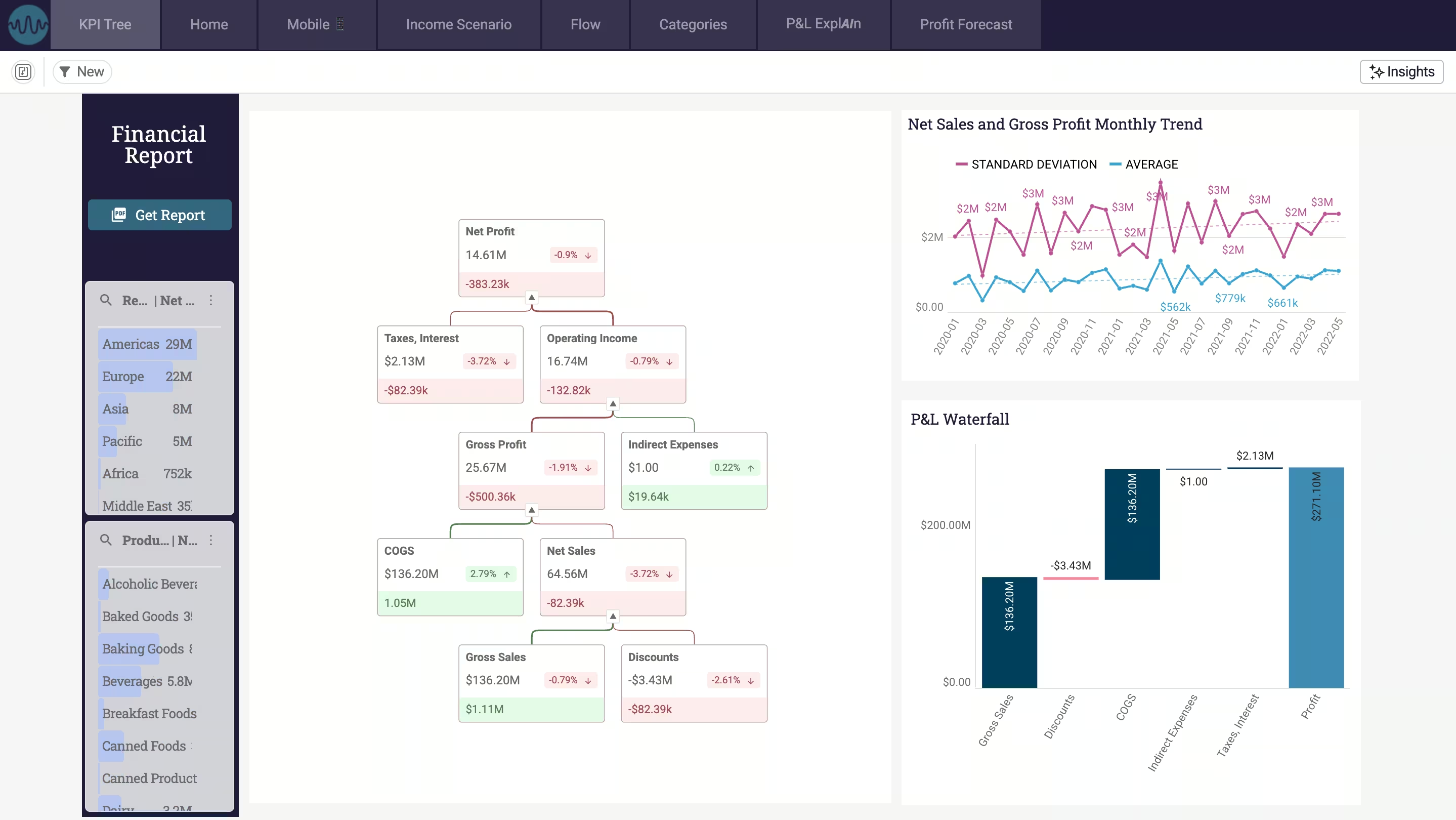
- Financial P&L: Consolidated statements and self-service period-over-period logic on governed Snowflake data — no SQL, no data-team ticket.
Finance teams already running on Snowflake
The budgeting app is one workflow in a bigger shift: finance teams moving their whole operating model onto Snowflake. Two examples, both on Snowflake, show the payoff of running finance on the data cloud rather than beside it:
- GlobalData — the close on Snowflake. Around 250 accountants cut monthly management accounts from four to five person-weeks to effectively a single click, by rebuilding financial reporting as a governed workflow on Snowflake instead of in spreadsheets. The same foundation — live data, writeback, governance — is what a budgeting app is built on. Read the full story.
- Ceres Pharma — consolidation on Snowflake. After 14 acquisitions, finance unified master data across entities on Snowflake, mapping each record to one corporate standard and writing it back. Clean, consolidated dimensions are the prerequisite for budgeting across business units — you can’t plan across the org until the org’s data agrees. Read the full story.
Neither is a budgeting story on its own — but together they show the architecture a budgeting and forecasting data app sits on: governed finance workflows, running natively on Snowflake.
How to get started
You don’t replatform to build this. The shortest path:
- Confirm actuals are in Snowflake. ERP/GL data landed via your data pipelines is the prerequisite — and for most finance teams it’s already done.
- Start with one planning workflow. Pick the budget or forecast that currently lives in the most painful spreadsheet, and rebuild that one as a data app with writeback to Snowflake.
- Govern from Snowflake. Use Snowflake RBAC for who can write, and Time Travel for the audit trail — don’t recreate governance in a separate tool.
- Add forecasting and AI once the loop is closed. With plan and actuals in one place, layer Snowpark forecasting and Cortex variance explanations on top.
Frequently asked questions
What is a budgeting and forecasting data app on Snowflake?
It's an interactive, read-and-write application that runs the budgeting and forecasting workflow directly on Snowflake. Finance enters budget figures, routes approvals, generates forecasts, and analyzes variance against live Snowflake data — with inputs written back to Snowflake tables rather than kept in a separate spreadsheet or planning tool.
Why build budgeting on Snowflake instead of a separate planning tool?
Because your actuals already live in Snowflake. Building the budget there too means plan and actuals share one source of truth, one governance model, and one engine — no syncing a separate copy, no drift, and consolidation across business units scales natively.
How does forecasting work on Snowflake?
Forecasts run where the data sits. A Snowpark stored procedure can apply time-series forecasting (for example, a Prophet model) to historical data and write the result back to Snowflake — so a business user gets an advanced forecast from an input form, without a Python notebook or a data scientist's time.
Is the budget data governed and auditable?
Yes. Budget inputs are written back under Snowflake RBAC, so the same row-level security and access controls that protect actuals protect the plan. Snowflake Time Travel makes every change auditable — who changed what, when, and the prior value.
Does the data leave Snowflake?
No. A warehouse-native data app queries and writes back in place — the data never moves. Security, row-level rules, and masking are passed through from Snowflake, and forecasting and AI run in Snowflake via Snowpark and Cortex.
Can AI help with variance analysis?
Yes. With plan and actuals in one place, variance is a live query — and because Cortex runs inside Snowflake, an AI layer can draft variance explanations in plain language, grounded in the same governed numbers rather than a separate, ungoverned copy.
Build your budgeting workflow on Snowflake
Astrato is the warehouse-native BI platform purpose-built for Snowflake — a validated Snowflake partner with writeback to Snowflake tables, Snowpark forecasting, Cortex AI insights, and governance passed straight through from Snowflake.
Explore the Snowflake integration or book a demo to see budgeting, forecasting, and variance run as one governed data app on your own Snowflake data.
Ready to experience next-gen analytics?
See how Astrato runs natively in your warehouse.