Dashboard vs Data App: What's the Difference?
Dashboard vs data app: a dashboard lets you see your data; a data app lets you act on it. Compare the two across different use cases and when to use each.


A dashboard lets you see your data. A data app lets you act on it. This guide compares the two — across what they do, how they handle live data and governance, and exactly when to reach for each — so you can tell which one a given problem actually needs.
Search “dashboard vs data app” and you’ll find a lot of hand-waving. So here is the difference in one line, before anything else:
A dashboard is read-only — you look at the data. A data app is read-and-write — you look at the data and act on it, with your action written back to the warehouse.
Everything else — governance, freshness, who it’s for, how you build it — follows from that one difference in direction. The rest of this guide unpacks it, and shows you when each one is the right tool.
What is a dashboard?
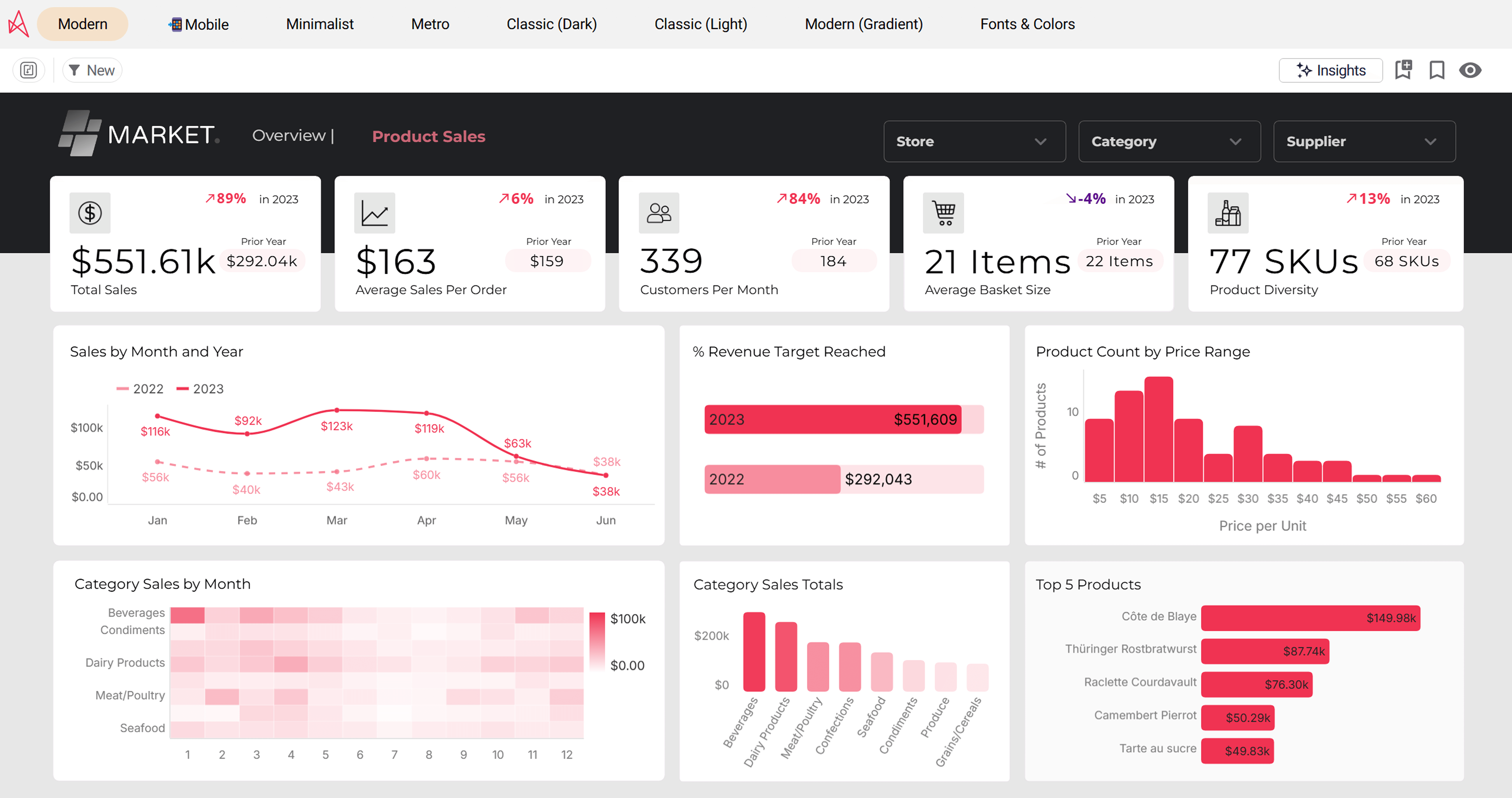
A dashboard is a visual interface that brings key metrics together on one screen so people can monitor business performance at a glance. It pulls from one or more data sources, turns the numbers into charts, and lays them out so a stakeholder can read the state of the business in a few seconds. The BI dashboard is the signature artifact of business intelligence — and for good reason. A well-designed dashboard is the fastest way to democratize data, turn complex information into a clear snapshot, and give end users a shared view of the same KPIs.
Modern BI tools make dashboards easy to build. Power BI, Tableau, and Qlik all offer drag-and-drop interfaces, large chart libraries, and interactive dashboards that let users filter and drill without writing Python or SQL. The defining trait, though, is direction: a dashboard is read-only. Data flows one way — out of the warehouse, through the BI platform, onto the screen. You can slice it, sort it, and export it, but the dashboard itself doesn’t change the underlying data. It is a window, not a workspace.
What is a data app?
A data app is the read-and-write successor to the dashboard: an interactive interface that lets people both see data and act on it, with every action written back to the warehouse under governed SQL. (We go deep on this in our guide to what a data app is.) It often looks like a dashboard — same charts, same filters — but it adds inputs: forms, approve buttons, editable cells, sliders. When a user acts, the data app captures that input as a governed write.
The reason that matters: it closes the gap between insight and action. With a dashboard, acting on what you see means leaving the tool — export to Excel, email a colleague, file a request. With a data app, the action happens in the same governed surface, so the workflow and the analytics live in one place. That’s the shift from a tool that informs to one that does something — the heart of the modern data analytics workflow.
Dashboard vs data app: the key differences explained
The table above is the summary. Here is what each row actually means in practice.
1. Direction: read-only vs read-and-write
This is the root difference every other one grows from. A dashboard reads. A data app reads and writes. When the entire point of a screen is to look, you have a dashboard; when the screen is built to let you do, you have a data app. A submit button alone doesn’t make the difference — what matters is whether that action is written back to the warehouse under governance, or just handed off to another tool.
2. What you can do with it
On a dashboard you use the data by viewing, filtering, and drilling — monitoring metrics against a threshold, checking a forecast, reading a summary. A data app keeps all of that and adds action: a sales rep updating an account, a controller approving a budget line, a planner adjusting an input and watching the forecast re-run. Same interface family, very different end goal.
3. Data freshness
Traditional BI often runs on a dataset that’s extracted and refreshed on a schedule, so the dashboard shows last night’s state. A data app depends on real-time data — because if one user writes a value, the next user has to see it immediately. That’s why data apps query the warehouse live rather than working from a copy: the loop only closes if the data is current in real time.
4. Governance
A dashboard needs read permissions. A data app needs read and write permissions, plus an audit trail — because now people are changing data, not just viewing it. The cleanest way to handle that is to inherit governance from the warehouse, so the same semantic definitions and row-level rules apply whether someone is reading a metric or writing one. Governance designed in, not bolted on.
5. Who it’s for
Dashboards serve people who need to monitor — executives, analysts, anyone watching business activities and reacting when something crosses a line. Data apps serve the people who own the process and have to act on it. A dashboard answers “what’s happening?” A data app answers “what’s happening, and let’s do something about it, now.”
When to use a dashboard vs a data app
Neither is better; they answer different questions. Use this as a quick decision guide.
Reach for a dashboard when…
- The job is to monitor — a high-level view of KPIs, a snapshot of business performance, a board summary.
- Users need to read and react, not change the data: spotting a trend, watching a metric against a threshold.
- You want the fastest, most scalable way to put a shared, customizable view in front of many end users.
Reach for a data app when…
- Seeing the number is only step one — someone then has to act: approve, adjust, submit, remap.
- The process currently lives in a spreadsheet or an email chain that sits next to the dashboard.
- The action needs to be governed and audited — a decision recorded as data, not a change made off to the side.
A useful test: if the honest answer to “what happens after someone reads this?” is “they go and do something in another tool,” that’s a data-app job wearing a dashboard’s clothes.
Do you have to choose between dashboards and data apps?
No — and this is the part most “dashboards vs data apps” comparisons miss. A data app includes dashboard capabilities; the dashboard is one component of it. The charts, filters, and interactive dashboards you’d build in a BI solution are still there — the data app simply adds the ability to act on them. So the practical question isn’t “dashboard or data app?” It’s “does this screen need to do anything beyond inform?” If not, a dashboard is perfect. If so, a data app gives you the dashboard and the workflow in one governed place.
Dashboard vs data app: real examples
The difference is clearest in production. Each of these started as a dashboard problem and turned out to be a data-app one:
- Finance close. At GlobalData, roughly 250 accountants used to read management-accounts dashboards, then rebuild the numbers in spreadsheets — four to five person-weeks a month. As a data app, a hierarchy change now propagates in about 15 minutes, and the board still gets the same report. Read the full GlobalData story.
- Master data. Ceres Pharma, after 14 acquisitions, didn’t need a dashboard showing mismatched product codes — they needed to fix them. A data app lets business experts map each product to one corporate code and write it back. Read the full Ceres Pharma story.
- Scenario planning. Elbiil’s customers don’t want a dashboard of current prices; they want to enter a hypothetical and see the result against live data — a what-if a read-only dashboard simply can’t answer. Read the full Elbiil story.
Frequently asked questions
What is the difference between a dashboard and a data app?
A dashboard is read-only: you view, filter, and drill into the data. A data app is read-and-write: you do all of that and also act — submit, approve, edit — with the action written back to the warehouse under governance. A dashboard informs; a data app gets something done.
Is a data app just a dashboard with buttons?
No. A submit button alone doesn't make a data app. What defines one is that the action is written back to the warehouse as a governed, audited record — not exported to a spreadsheet or emailed to someone. The destination of the action is the test, not the presence of a button.
Can Power BI or Tableau build data apps?
Both are dashboard-first BI tools, and both offer limited writeback through extensions or add-ons — but neither was architected with writeback and governed actions as first-class capabilities. For genuine data apps, warehouse-native platforms built for read-and-write are a better fit.
When should I use a dashboard instead of a data app?
Use a dashboard when the job is to monitor — a high-level view of KPIs, a snapshot of business performance, a board summary — and no one needs to change the data from that screen. The moment acting on the insight matters, a data app fits better.
Do dashboards and data apps use the same data?
They can — and ideally do. The cleanest setup runs both directly on the same governed warehouse, so a dashboard and a data app share one source of truth and one set of metric definitions. The data app simply adds the ability to write back to that same source.
Is a data app the same as an interactive dashboard?
Not quite. An interactive dashboard lets you filter, sort, and drill — but it's still read-only. A data app adds the ability to write data back. Interactivity is about exploring the view; a data app is about changing the underlying data.
See a dashboard and a data app, side by side
Astrato is the warehouse-native BI platform that does both — interactive dashboards and governed data apps, on one surface, running directly on Snowflake, BigQuery, and Databricks.
Book a demo or start a free trial to see the same screen go from read-only to read-and-write on your own data, and explore live examples in the demo gallery.
Ready to experience next-gen analytics?
See how Astrato runs natively in your warehouse.