FP&A Without Spreadsheet Sprawl: Escaping Excel Chaos in Finance
Spreadsheet sprawl is the hidden tax on FP&A: forked models, version chaos, formula errors, no single source of truth. What it costs and how to escape it.

Spreadsheet sprawl is the quiet tax on every FP&A team — dozens of forked models, no single source of truth, and a forecast that breaks every time someone touches the wrong cell. This guide names the problem, counts its real cost, and shows how to escape it without prying Excel out of your analysts’ hands.
Ask an FP&A team to “pull up the forecast” and watch what happens. There isn’t one forecast — there are six. One on a shared drive, one in someone’s inbox, two more on laptops, and the “real” one that only one analyst knows how to open without breaking it.
Each was correct the day it was built. None agrees with the others now.
That is spreadsheet sprawl: the slow proliferation of disconnected, forked Excel files that no FP&A team sets out to create and every one ends up with.
It isn’t a sign of a sloppy team — it’s the default end state of doing financial planning and analysis in spreadsheets at scale. This guide is about why it happens, what it actually costs, and how to escape it — without taking Excel away from the people who think in it.
TL;DR
Spreadsheet sprawl is the uncontrolled growth of disconnected, forked Excel models across an FP&A team — many versions of the same forecast, none of them the single source of truth.
It’s expensive in ways that don’t show up on a budget line: formula errors, version-control chaos, no audit trail, key-person risk, and analysts spending more time reconciling files than analyzing the business.
The fix isn’t “ban Excel.” It’s to give FP&A one governed source of truth — live warehouse data, a shared semantic layer, and governed inputs via writeback — so the model stops forking. You keep the Excel output; you lose the sprawl.
What is spreadsheet sprawl?
Spreadsheet sprawl is what happens when the spreadsheet stops being a tool and becomes the system of record.
A single financial model gets copied for a new scenario, emailed for review, saved as a new version, forked for a one-off analysis — and within a quarter there are a dozen Excel files that all claim to hold the same numbers and quietly disagree.
It’s specific to how FP&A works. Every rolling forecast, every scenario, every headcount or capex plan tends to start life as a copy of last month’s workbook.
The discipline runs on iteration, and Excel’s answer to iteration is a new file. Multiply that across an FP&A team and a fiscal year, and sprawl isn’t a risk — it’s the guaranteed outcome.
Why FP&A breeds sprawl specifically
Other functions use spreadsheets; FP&A lives in them. Three things about the work make sprawl almost inevitable:
- Iteration by copy. A new scenario or a rolling forecast usually begins as “save as” on the previous model. Each fork is a new source of truth that immediately starts drifting from the others.
- The model is the analyst’s mind. Finance professionals think in formulas. The model isn’t just output — it’s how they reason about the business, which is why “just use the tool” never sticks if the tool can’t flex the way a spreadsheet does.
- Inputs come from everywhere. Actuals from the ERP, headcount from HR, pipeline from the CRM, assumptions from the business — pulled in as exports and pasted into cells, so every workbook carries its own slightly different copy of the data.
None of these shows up as a line item, which is exactly why sprawl persists. Added up, they’re the biggest drag on an FP&A team’s time and credibility.
Formula errors at scale
The research finance never wants to cite is real: the large majority of complex spreadsheets contain errors. A formula that references the wrong cell, a range that didn’t extend when a row was inserted, a hardcoded number where a link should be — in a board forecast, one bad cell is reputational damage, not a typo.
Version-control chaos
With no real version control, “final_v7_FINAL.xlsx” is a genre, not a joke. The team spends real hours every cycle just establishing which file is authoritative — the reconciliation tax you pay before any analysis begins.
No audit trail
When an assumption changes inside a workbook, there’s no reliable record of who changed it, when, or why. That’s a governance problem in everyday planning and a serious one at audit — the same lack of audit trails that makes the month-end close painful makes the forecast indefensible.
Key-person risk
Every sprawled team has the one model only one person fully understands. When they’re on leave — or they leave — the forecast becomes fragile in a way no one can quite fix.
No single source of truth
The deepest cost: with the numbers living in many forked files, there is no single source of truth, so “whose revenue figure is right?” has no clean answer. Every meeting starts by reconciling versions instead of deciding anything.
Sprawl is a structural problem, not a discipline problem
The instinctive fix is process: stricter file naming, a locked master workbook, a rule that only one person edits. It never holds, because the cause isn’t indiscipline — it’s structural.
A spreadsheet was designed to be a personal analysis tool, and FP&A teams press it into service as a shared, governed system of record. It was never built for that job.
The spreadsheet was never the format problem; it was the system-of-record problem. So the durable fix isn’t a better rule about spreadsheets — it’s moving the source of truth somewhere that was built to be shared and governed.
How to escape spreadsheet sprawl (without losing Excel)
The goal isn’t to ban the spreadsheet — it’s to stop the model from forking by giving FP&A one governed place the numbers actually live. That’s the pattern behind modern, governed FP&A:
- Put the source of truth in the warehouse, not a file. When actuals and inputs live in the data warehouse instead of pasted into cells, every analyst works from the same current numbers — the fork loses its reason to exist.
- Define metrics once, in a semantic layer. A shared semantic layer means “revenue” or “margin” is defined once and is identical everywhere — the single source of truth that a folder of spreadsheets can never provide.
- Make planning a data app, not a read-only dashboard. FP&A needs to enter numbers, not just view them — so the answer isn’t a dashboard, it’s a data app: a governed surface where analysts both see the data and act on it. (That read-vs-write distinction is the whole difference between a dashboard and a data app.)
- Capture inputs with governed writeback. When a planner enters an assumption, writeback commits it to the warehouse under role-based controls — so the input is governed data, not a cell in someone’s private copy.
- Get governance and audit trails for free. Run it on the warehouse and governance and security — row-level permissions, a full audit trail of who changed what — are inherited, not rebuilt. The thing sprawl can never give you comes standard.
- Keep the Excel output. Escaping sprawl doesn’t mean losing the workbook the board expects — reporting and distribution can still produce branded Excel, PowerPoint, and PDF, generated from the one governed source instead of rebuilt by hand. You keep Excel as an output; you lose it as the system of record.
This is the same governed-workflow pattern across every FP&A process — it’s how teams run a faster month-end close and how they build budgeting and forecasting on the warehouse.
Sprawl is just the problem these workflows were built to solve, seen from the Excel side. (For the bigger picture, see our guide to finance analytics workflows.)
FP&A software vs. a warehouse-native approach
There are two broad ways off the spreadsheet. The first is dedicated FP&A software — a cloud-based FP&A platform (driver-based planning tools and the like) that replaces Excel with a purpose-built planning system.
These are powerful for complex, multi-driver planning, but they introduce their own copy of your data that has to be synced with the warehouse, and they ask analysts to leave the spreadsheet model they think in.
The second is warehouse-native: leave the data where it already lives and build governed data apps directly on it. You don’t move data into a separate FP&A tool, and you don’t lose the connection to the actuals.
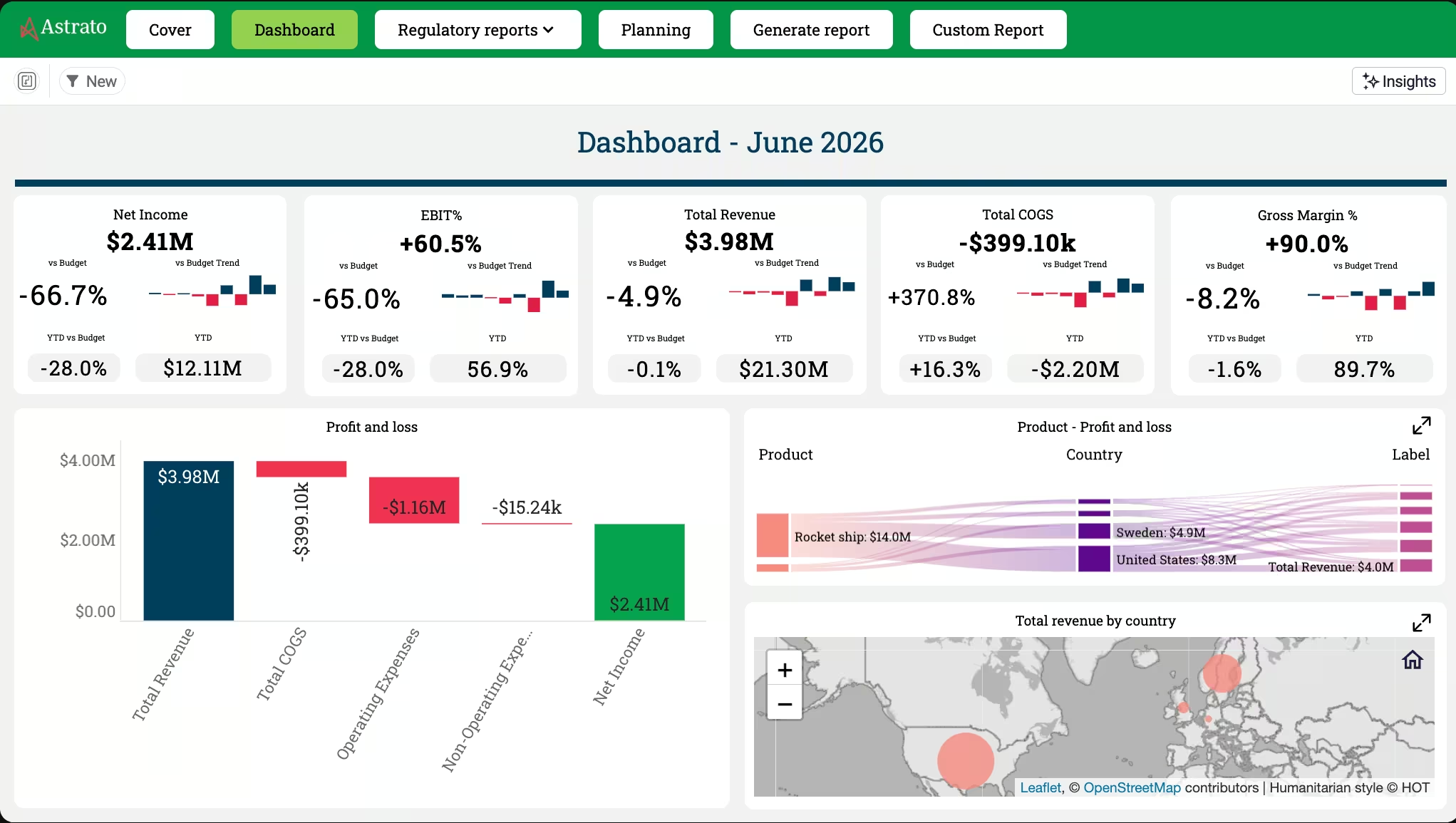
For teams whose data is already centralized in a warehouse, this is often the lighter path out of sprawl — the source of truth and the planning surface are the same place.
Which fits depends on how complex your planning is and where your data lives; the point is that both beat a folder of forked workbooks.
Frequently asked questions
What is spreadsheet sprawl in FP&A?
It's the uncontrolled proliferation of disconnected, forked Excel files across a finance team — many copies of the same forecast or model that drift apart over time, so there's no single source of truth. It's the default end state of doing financial planning and analysis in spreadsheets at scale.
Why is Excel risky for FP&A?
Not because Excel is bad, but because it was built as a personal analysis tool, not a shared system of record. Used that way it produces formula errors, version-control chaos, no audit trail, and key-person risk — the well-documented reality that most complex spreadsheets contain errors becomes a board-level risk in a forecast.
How do you reduce spreadsheet errors in finance?
Process fixes (naming conventions, locked master files) help at the margin but don't hold, because the cause is structural. The durable fix is to move the source of truth off the file — onto governed warehouse data with metrics defined once in a semantic layer — so there's one set of numbers instead of many error-prone copies.
Do you have to stop using Excel to fix sprawl?
No. The goal is to stop the spreadsheet being the system of record, not to ban it. You can keep Excel as an output — the branded workbook the board expects — while the authoritative numbers and inputs live in a governed source. You lose the sprawl, not the spreadsheet.
What's the difference between FP&A software and a warehouse-native approach?
Dedicated FP&A software replaces Excel with a purpose-built planning platform, but keeps its own copy of your data to sync. A warehouse-native approach builds governed data apps directly on the warehouse where your data already lives, so the source of truth and the planning surface are one place. Both beat forked workbooks; which fits depends on your planning complexity and data setup.
Is spreadsheet sprawl a governance problem?
Yes — fundamentally. When numbers live in many private files, there's no reliable record of who changed what, and no enforced permissions. Moving FP&A onto a governed source means row-level security and a full audit trail are inherited automatically, which is exactly what a folder of spreadsheets can never provide.
Give FP&A one source of truth
Astrato is the warehouse-native BI platform FP&A teams use to escape spreadsheet sprawl — planning, forecasting, and analysis as governed data apps on Snowflake, BigQuery, and Databricks, with writeback, a built-in semantic layer, inherited governance, and the branded Excel and PDF output the board still expects.
Explore the finance demo apps or book a demo to see your forecast run from one governed source instead of a folder of forked files.
Ready to experience next-gen analytics?
See how Astrato runs natively in your warehouse.