We Replaced the Month-End Budget Spreadsheet With a Live App
Turn the month-end budget-vs-actuals scramble into a live app: enter the budget, see variance update against live warehouse data, with writeback and governance built in.

Your actuals already live in the warehouse. Your budget lives in a spreadsheet. This is how finance closes that gap — a budget-vs-actuals app where the plan and the performance against it finally sit in the same place, on the same live data.
Every finance team knows the month-end ritual. The actuals — every transaction, every cost centre — sit in the warehouse, governed and current. The budget they’re measured against sits in a spreadsheet on someone’s laptop. Two sources of truth, reconciled by hand, and the version that gets emailed around is out of date the moment it’s sent.
There’s a better shape for this. Instead of exporting actuals out to plan and importing the plan back to report, the whole budget-vs-actuals workflow runs as an app on the same live warehouse data as everything else. Finance enters the budget, variance updates against live actuals, and nobody exports a thing.
This is one of the finance apps in the Astrato demo gallery. Here’s what it does, how it’s built, and why running it on the warehouse — not beside it — is the part that makes it trustworthy.
Where the budget spreadsheet breaks down
The spreadsheet isn’t the problem because it’s a spreadsheet. It’s the problem because of everything that happens around it once more than one person depends on it.
- Nobody knows which version is the truth. Budget_v7_FINAL_v2 lands in three inboxes, gets edited in two of them, and now there are three budgets. The reconciliation is manual and it never ends.
- It’s stale the moment it’s exported. Actuals keep moving in the warehouse; the export doesn’t. Every variance number is measured against a snapshot that was already out of date when it was pasted in.
- There’s no audit trail. A figure changes and there’s no record of who changed it, when, or what it was before. When the number is wrong in the board pack, you can’t trace it back.
- Access is all-or-nothing. Either everyone can see every business unit’s numbers, or you keep a separate file per region and stitch them together by hand later. Neither is governance.
- It buckles at consolidation. Roll a budget up across cost centres and entities and the workbook slows, links break, and a single fat-fingered cell quietly skews the total.
None of this is a discipline problem. It’s an architecture problem: the plan lives somewhere the actuals don’t, so the two can never agree without someone reconciling them by hand.
See it work
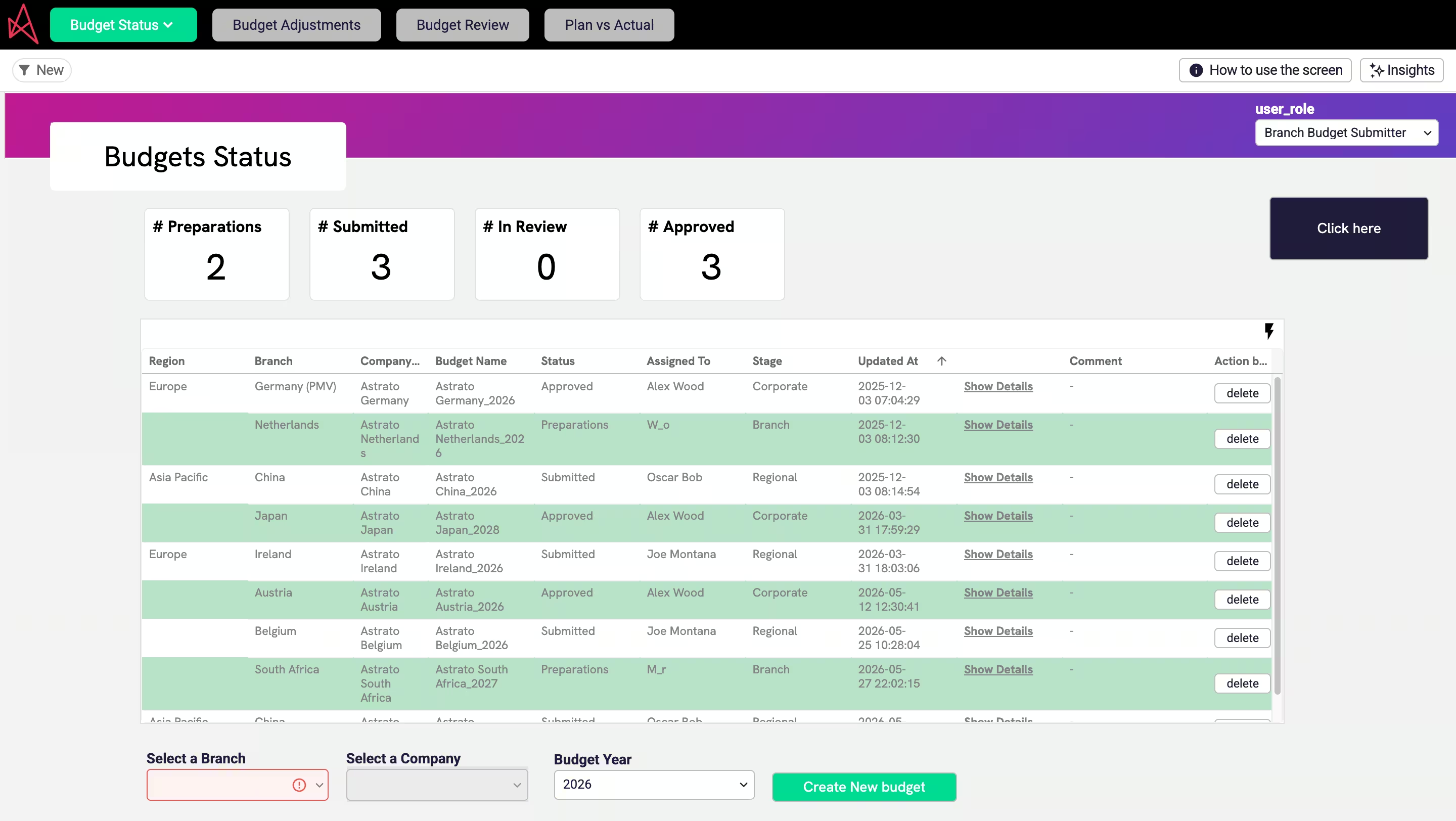
Budget against actuals in real time, with utilisation and breakdowns by company, category and period. Where a dashboard would only show you the gap, this lets finance do the planning in the same view: adjust a figure, see the variance move, drill into the line driving it.
How it’s built
You can rebuild this without replatforming. Five steps:
- Connect to live warehouse data. Point Astrato at wherever your actuals land — Snowflake, BigQuery, Databricks. Queries run live against the source, so budget-vs-actuals is always current, not a nightly copy that drifted overnight.
- Model the numbers in the Semantic Layer Editor. Define your measures once — actuals, budget, variance, utilisation — and your dimensions: company, category, period. On Snowflake the editor auto-suggests joins, so related tables link with a click. Define “variance” here and it means the same thing in every tile and chart, so the app can’t contradict itself.
- Make budgets editable with writeback. Add a writeback input for the budget column. Finance types the target and it writes straight back to a governed table in the warehouse — queryable in SQL and joinable to actuals like any other data. This is the part a dashboard can’t do.
- Build the KPIs and breakdowns. Drop in the headline tiles, then variance by company and category, with drilldowns so someone goes from “we’re over” to the exact cost line driving it in two clicks.
- Add the calculations finance actually wants. Self-service formulas handle running totals, period-over-period comparisons and inline percentage variance — no SQL, no ticket to the data team.
What changes when budgeting is a governed data app
Move the same workflow onto live warehouse data and the problems above don’t get patched — they stop existing. The plan is now data, sitting next to the actuals, governed the same way.
- One source of truth. The budget is warehouse data, written next to the actuals. There’s no second copy to reconcile, because there’s no second copy.
- Always current. Variance is a live query against live actuals, not a snapshot. The number leadership asks for is right the moment they ask.
- Finance moves without waiting. Enter figures, run the breakdown, adjust an assumption — no export step and no data-team ticket for every change.
- One definition, everywhere. “Variance” and “utilisation” are defined once in the semantic layer, so every tile, chart and export agrees by construction.
- Scales with the org. Consolidating across business units runs on warehouse compute, not a laptop, so the budget doesn’t grind to a halt as the company grows.
Why it holds up
The reason this works as an app and not just a prettier spreadsheet: every budget edit writes back to the warehouse with a full audit trail, so you can see who changed which figure and when, and two planners can’t silently overwrite each other.
Access carries over from the warehouse, so a regional finance lead only sees and edits their own entities without you rebuilding permissions. It’s the same foundation GlobalData’s finance team runs on: by rebuilding reporting as a governed workflow on live warehouse data instead of spreadsheets, around 250 accountants cut monthly management accounts from four-to-five person-weeks to effectively a single click.
The budget stops being a file someone owns and becomes governed data the whole team can trust.
Make it yours
Open the Budgeting app in your workspace, point it at your own actuals table, and the monthly spreadsheet scramble becomes a live app. When you’re ready for the deeper FP&A version — rolling forecasts and AI-drafted variance explanations running in the warehouse — see Budgeting & Forecasting as a Data App on Snowflake.
Key takeaways
- Budget-vs-actuals works best as an app on live warehouse data, not a spreadsheet beside it.
- Define each measure once in the semantic layer so “variance” means the same thing everywhere.
- Writeback puts budget inputs in a governed warehouse table — audited, and joinable to actuals.
- Governance carries over from the warehouse, so access control isn’t rebuilt for every app.
Ready to experience next-gen analytics?
See how Astrato runs natively in your warehouse.