The Day I Realized Our Bug Dashboard Couldn't Fix a Single Bug
Stop bouncing bugs between a spreadsheet, Slack, and a ticketing tool. Build one live app to create, triage, and resolve issues in place — inline forms, writeback, governed.

A bug dashboard shows you what’s broken. Then you leave it to actually do anything about it. This is how you build one where spotting an issue, triaging it, and updating it happen in the same place — on live data, without the tool-hopping.
Watch how a bug usually moves through a team. Someone spots it and drops it in a spreadsheet. It gets discussed in a chat thread. It’s copied into a ticketing tool. And somewhere else entirely, a dashboard reports on how many are open. Four places, four copies, and no single view that’s both current and actionable.
So the status is always slightly wrong, “what’s stuck?” takes a manual pull, and the person triaging spends more time reconciling tools than fixing anything.
The Bug Reporter app in the Astrato gallery collapses that into one live surface: create and manage issues with inline forms, filter by status, assignee and priority, and see what’s rising, resolved, or stuck — all in the same place, on real-time data. Here’s what it does, how it’s built, and why doing it on the warehouse is what makes the whole loop trustworthy.
Where bug tracking falls apart
Every team has a bug process. The trouble is that it’s spread across tools that don’t agree with each other.
- The bug lives in four places at once. A spreadsheet, a chat thread, a ticketing tool, and a reporting dashboard — each holding a slightly different version of the truth.
- Status is always a little stale. By the time the dashboard refreshes, three tickets have moved. The number you’re looking at was true an hour ago.
- “What’s stuck?” is a manual job. The one question that matters in triage — what’s been sitting too long — takes someone exporting and sorting by hand.
- Seeing and doing are in different tools. You see the problem in the dashboard, then leave it to act somewhere else, and log it in a third place. The loop never closes cleanly.
It’s the classic pattern: see it, export it, message someone, wait. That’s not a reporting problem — it’s a workflow problem.
See it work
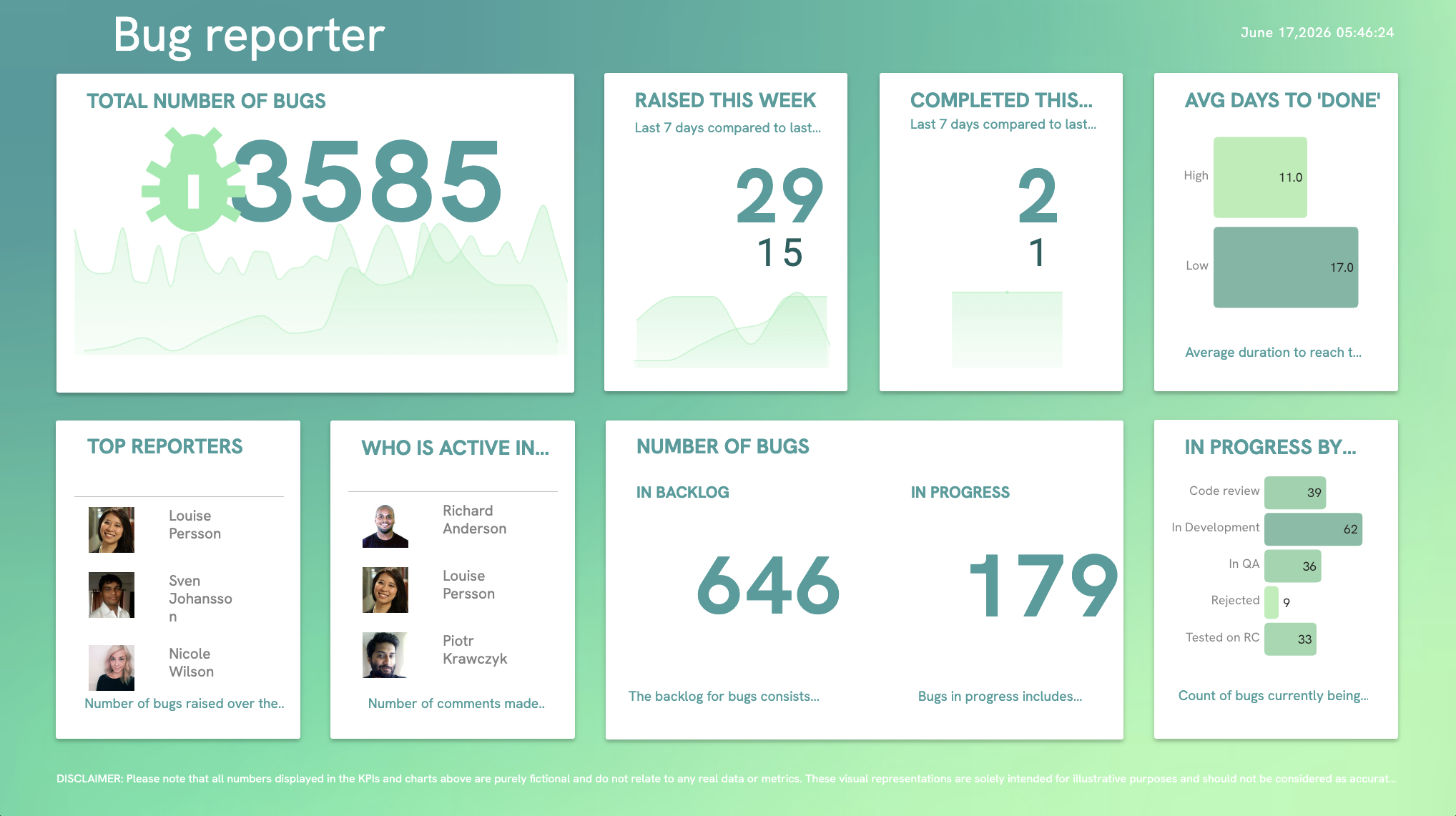
Create an issue with an inline form. Change a status, reassign an owner, set a priority — without leaving the view. Filter to what’s rising, what’s resolved, and what’s stuck, and see who’s reporting and resolving the most. It’s the whole triage loop — spot it, act on it, track it — on one screen, backed by live data.
How it’s built
Five steps, on data you already have:
- Connect to live warehouse data. Point Astrato at your issues table in Snowflake, BigQuery or Databricks. The board reads live, so status is current, not a refresh behind.
- Model the issue in the Semantic Layer Editor. Define the fields once — status, priority, assignee, reporter, age — and the measures behind the panels: open count, time-in-status, resolution rate. Every view counts the same way.
- Add inline forms with writeback. Create and update issues directly in the app with an inline form. The change writes back to the warehouse issues table — not a local copy — so seeing and doing share one record.
- Build the triage views. Filters by status, assignee and priority; panels for rising, resolved and stuck; leaderboards for top reporters and active contributors. The answer to “what needs attention?” is on the screen, not in an export.
- Govern who can do what. Access carries over from the warehouse, so a reporter can file and a triager can manage the queue — with each change attributable, without you building a separate permission layer.
What changes when bug tracking is a data app
Put the whole loop on live warehouse data and the tool-hopping stops — seeing the bug and acting on it become the same motion.
- One place to see and act. Spot the issue and triage it in the same view, instead of bouncing between four tools.
- Status is live, not stale. Every change is a write to the warehouse, reflected immediately — the board is never a refresh behind reality.
- “What’s stuck” answers itself. Time-in-status is a modelled measure, so the stuck queue is a filter, not a manual sort.
- Every change is attributable. Writeback means edits land in a governed table — you can see who moved what, and when.
- Product, QA and support self-serve. The teams closest to the bugs manage them directly, without a ticket to whoever owns the reporting tool.
Why it holds up
The reason this works as a workflow and not just a nicer bug list: every edit goes through writeback into a governed warehouse table, with an audit trail, so the record people act on is the same record everyone reports on — no divergent copy in a spreadsheet or a chat thread. Access is inherited from the warehouse, so who can file versus who can manage the queue is enforced at the data layer. And because it’s a data app, not a dashboard, seeing and doing close the loop in one place instead of scattering across tools. The status you’re looking at is trustworthy because there’s only one of it.
Make it yours
Open the Bug Reporter app in your workspace, point it at your own issues table, and give product, QA and support one place to spot and fix. It’s the same governed-writeback pattern behind the Budget-vs-Actuals app — a live view, an inline action, and a warehouse that stays the single source of truth.
Key takeaways
- Bug tracking breaks because seeing and doing live in different tools — it’s a workflow problem, not a reporting one.
- Inline forms with writeback let you triage in place; the edit lands in a governed warehouse table, not a local copy.
- Modelling time-in-status turns “what’s stuck?” from a manual export into a filter.
- One governed record means the status everyone reports on is the status people act on.
Ready to experience next-gen analytics?
See how Astrato runs natively in your warehouse.