Semantic Layer for Data Apps: Why Writing Data Back Demands Governed Definitions
Dashboards read data; data apps write it back. See why safe write-back needs a governed semantic layer — with Ceres Pharma proof.

A semantic layer is what lets a data app act on your warehouse safely. Dashboards only read data, so a loose definition is an annoyance. Data apps let people write data back — and a loose definition becomes a liability. This guide explains why data apps raise the stakes, what the semantic layer has to provide, and how Ceres Pharma used governed write-back to unify master data across 14 acquisitions.
TL;DR
- A semantic layer for data apps is the governed model that lets an application read and write warehouse data using one shared set of definitions.
- Answers tolerate a loose definition; writes don’t. When users submit, approve, or correct values, everyone must be acting on the same governed numbers or the writes themselves become untrustworthy.
- Without it, a data app inherits conflicting metrics, no lineage, and no shared security — so bad data flows back into the warehouse at machine speed.
- With it, one definition of every metric, row-level security inherited from the warehouse, and full lineage make write-back safe at scale.
- Proof: Ceres Pharma unified master data across 14 acquisitions by writing governed dimensions back to Snowflake through an Astrato data app.
Most conversations about the semantic layer stop at the answer: define “revenue” once, and every dashboard and AI agent returns the same number. True, and important. But it misses where the semantic layer matters most — the moment your tools stop just reading data and start writing it back. That’s the shift from a dashboard to a data app, and it changes the stakes entirely.
What is a data app?
A data app is a governed, warehouse-native surface where people both see data and act on it — submitting values, approving figures, correcting records, triggering a workflow — with the changes written back to the warehouse. A dashboard shows numbers; a data app lets you act on them.
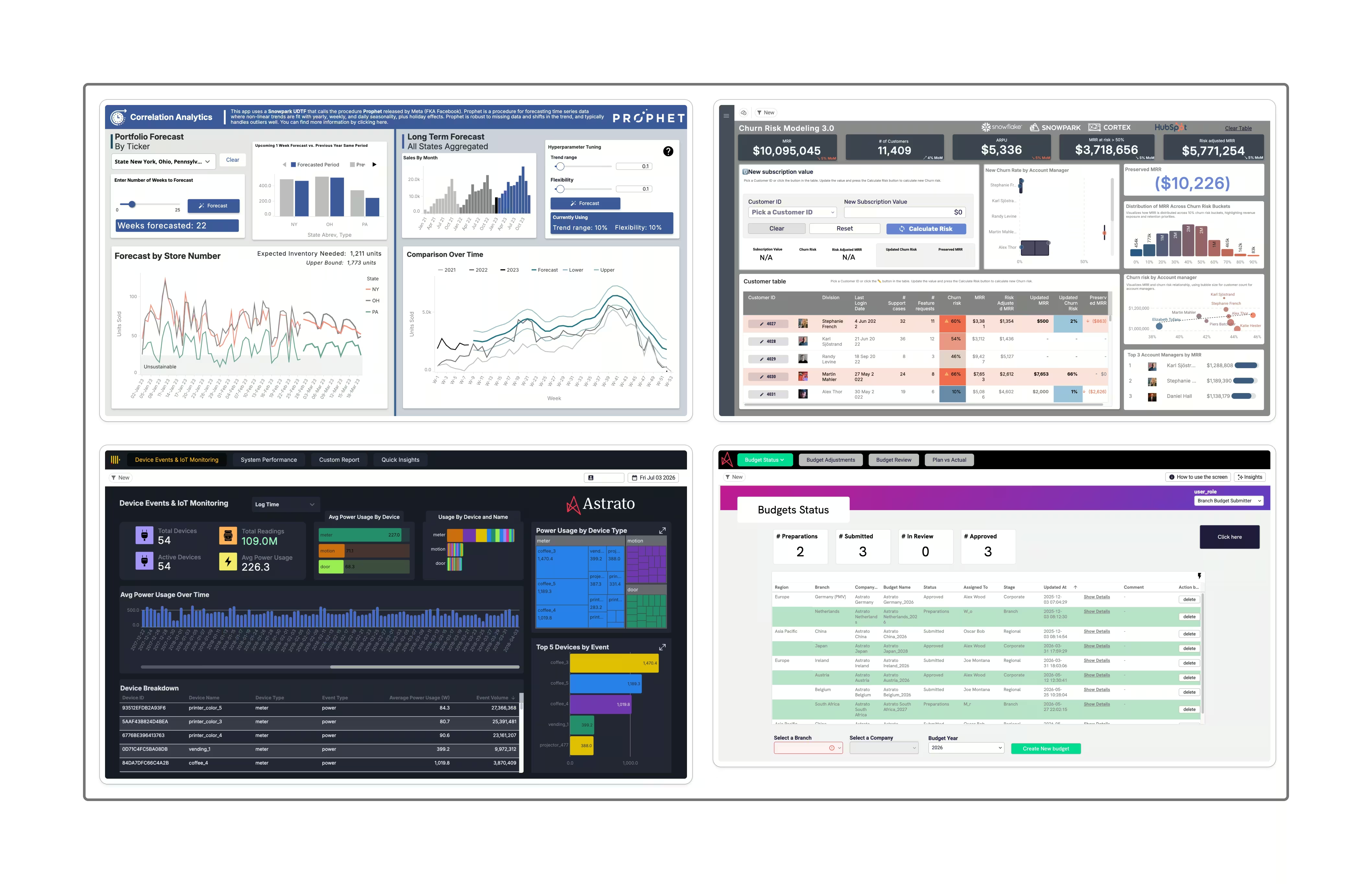
A budgeting app where controllers enter forecasts, an approval flow where a manager signs off a figure, a master-data tool where someone maps a product code — these are data apps. Each one writes something back into the source of truth.
Why do data apps need a semantic layer?
Because a write is only as trustworthy as the definition behind it. When a data app reads a number, shows it to a person, and lets that person act on it, every part of that loop has to agree on what the number means. If the app’s “net revenue” differs from the warehouse’s “net revenue,” the person is making a decision — and writing a value — against the wrong baseline. The error doesn’t just sit on a screen; it flows back into the warehouse and contaminates everything downstream.
The semantic layer removes that ambiguity. Because the data app reads and writes through the governed model, every metric it shows and every value it writes uses the same definitions, the same relationships, and the same permissions as everything else in the stack. One source of truth, whether the traffic is flowing out to a screen or back to the warehouse.
Answers tolerate loose definitions. Writes don’t.
This is the distinction the rest of the category skips. A dashboard is read-only, so an inconsistent definition is a reconciliation headache — annoying, arguable, ultimately survivable. A data app is different in kind, not degree. When a user changes data through an operational workflow, a wrong definition becomes a wrong write, and a wrong write is permanent until someone catches it.
Put simply: a loose definition on a dashboard produces a bad meeting. A loose definition under a data app produces bad data in your warehouse. That’s why the semantic layer stops being a nice-to-have the moment people can act — it’s the thing that keeps write-back safe at scale.
What breaks without a semantic layer under a data app?
Three failures show up quickly when a data app writes back without a governed model beneath it:
- Conflicting definitions get written as fact. If the app calculates a metric its own way, the value it writes back disagrees with the rest of the business — and now the disagreement lives in the warehouse, not just a spreadsheet.
- No lineage, no audit. When a written value looks wrong, you need to trace exactly which definition and which user produced it. Without the semantic layer’s lineage, a write-back is an untraceable change.
- Security has to be rebuilt per app. If row-level security isn’t inherited from the warehouse, every data app re-implements permissions — and one gap means a user writes to data they should never have seen.
How Ceres Pharma unified master data with governed write-back
Ceres Pharma is a PE-backed pharmaceutical group that grew through 14 acquisitions into more than 20 legal entities across Belgium, Romania, Hungary, Bulgaria, and Italy. Each acquisition arrived with its own ERP, CRM, and logistics systems, so the same product could appear under three different codes from three different systems.
An earlier attempt to unify the data on a different stack had failed, leaving the business, in their own words, with a trust problem more than a data problem.
Rather than spend years merging ERPs, the team unified at the analytics layer with a best-of-breed stack: Snowflake as the warehouse, dbt Core for governance, and Astrato as the warehouse-native analytics and application layer. The centerpiece wasn’t a dashboard — it was a data app.
Inside Astrato, they built a Metadata Manager: an application that shows every product with all its local codes side by side and lets business users map them to one corporate standard. Those unified dimensions are written back into Snowflake, where dbt enforces the governance rules, forming the clean, trusted layer everything downstream depends on.
This is the wedge in the wild. The Metadata Manager only works because it writes governed definitions, not ad-hoc values — every mapping becomes part of the same trusted model, with an audit trail of who mapped what.
Their own lesson from the project: start with the foundation, not the dashboards. Do the boring part first. The semantic layer is that foundation, and write-back is what turned it from a place to look into a place to work.
What the semantic layer must provide for safe write-back
If you’re evaluating a platform for data apps, the semantic layer underneath needs four things:
- One definition of every metric, shared by the read and the write path, so an app never acts on a private version of the truth.
- Row-level security inherited from the warehouse, so an app can only ever read or write data the user was already allowed to touch.
- Full lineage and audit, so every written value traces back to a definition and a user.
- Warehouse-native execution, so writes land in the source of truth directly, with no extracted copy to drift out of sync.
Astrato provides these by design: a built-in semantic layer with warehouse-inherited security and inspectable lineage, and data apps with write-back that run on the same governed model. Governance isn’t bolted onto the app — it’s the foundation the app is built on. For the fundamentals of the layer itself, see what is a semantic layer.
Key takeaways
- Data apps read and write warehouse data; that write-back is what makes the semantic layer essential rather than optional.
- Answers tolerate a loose definition; writes don’t — a wrong definition under a data app becomes bad data in your warehouse.
- Without a governed model, data apps produce conflicting writes, no lineage, and per-app security gaps.
- Safe write-back needs one shared definition, warehouse-inherited security, full lineage, and warehouse-native execution.
- Ceres Pharma unified master data across 14 acquisitions by writing governed dimensions back to Snowflake through an Astrato data app.
Frequently asked questions
What is a semantic layer for data apps?
It’s the governed model an application reads and writes through, so every value it shows or writes back to the warehouse uses one shared set of metric definitions, relationships, and permissions.
Why can’t a dashboard just add a submit button?
Because the moment users write data, inconsistent definitions stop being a reporting nuisance and start corrupting the warehouse. A data app needs the governed model beneath it; a submit button on an ungoverned dashboard writes bad data faster.
Does write-back change the data in my warehouse?
Yes — that’s the point. A data app writes values back into the source of truth. The semantic layer is what ensures those writes are governed, secured, and traceable rather than ad-hoc.
Is the semantic layer only relevant for AI?
No. AI is one consumer, but data apps and write-back are where governed definitions matter just as much — arguably more, because the output is a permanent change to your data, not a read.
Ready to experience next-gen analytics?
See how Astrato runs natively in your warehouse.