How to Build a Semantic Layer (Warehouse-Native, Without a Multi-Year Project)
A practical guide to building a semantic layer: connect your warehouse, model joins, define metrics, secure and version it. No multi-year project.


You don’t need a multi-year program to build a semantic layer. This guide walks the practical steps — connect a warehouse, model your tables and joins, define governed metrics, secure it, and version it — using a warehouse-native approach that keeps definitions with your data instead of copying it out.
TL;DR
- To build a semantic layer: connect your warehouse, select tables, model relationships (joins), define dimensions and measures, secure it with row-level access, and version it.
- Warehouse-native is the fast path. Keeping semantics in the warehouse avoids a second copy of your data and the sync problems that come with it.
- Don’t hand-build everything. Modern tools infer joins from your schema and auto-name fields, so you start from a working model and refine.
- Define metrics with the business, once, in the layer — so “revenue” means one thing for every dashboard, app, and AI agent.
- In Astrato, all of this happens in the Semantic Layer Editor, and the finished model is available as version-controllable YAML.
A semantic layer has a reputation for being a heavyweight project — months of modeling before anyone sees value. It doesn’t have to be. If you build it where your data already lives, you can go from a connected warehouse to a governed model that dashboards, data apps, and AI agents all query in an afternoon. Here’s the practical sequence, and the decisions that matter at each step.
Before you start: choose your approach
There are three ways to implement a semantic layer, and the choice sets your timeline. A BI-tool (built-in) layer lives inside one analytics tool — simplest, but the definitions rarely travel. A universal (standalone) layer, like a dbt Semantic Layer or Cube setup, sits above the warehouse for every tool to share — most flexible, most work to stand up and maintain. A warehouse-native layer executes against the warehouse itself, with no second copy of your data. For most teams that want speed without giving up governance, warehouse-native is the shortest path — and, done well, it still lets you model once and run on Snowflake, BigQuery, or Databricks. (Full comparison in types of semantic layers.) The steps below follow the warehouse-native path.
Step 1: Connect your warehouse and select tables
Start where the data is. Connect the semantic layer to your cloud data warehouse — Snowflake, BigQuery, Databricks, Redshift — and point it at the tables you need. You’re not modeling yet; you’re choosing the raw material. Select the tables relevant to the business area you’re building for (say, sales), then pick the fields (columns) that matter. Resist the urge to pull everything: a focused model is faster to build and easier to trust.
In Astrato, this is the Select screen of the Semantic Layer Editor — you check the tables and fields you want, preview a sample of the data, and rename any field on the spot if its warehouse name is cryptic.
Step 2: Model relationships with joins
This is the heart of the data model: telling the layer how your tables relate. A customers table and an orders table only become useful together once you join them on a shared key. Define those joins and the layer can answer questions that span tables — “revenue by customer region” — without anyone writing the join by hand each time.
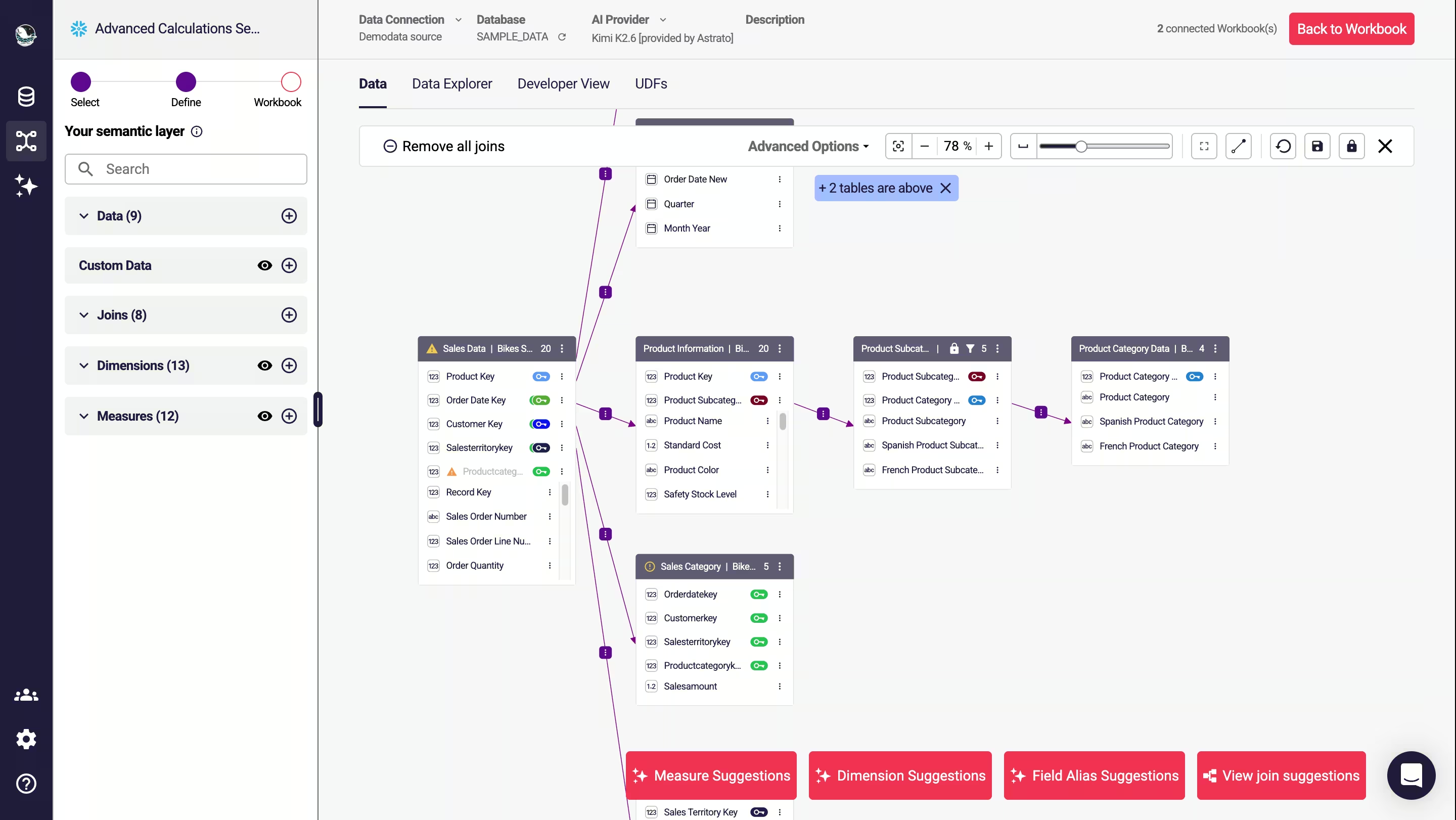
Don’t do this from a blank slate if you don’t have to. On a Snowflake source, Astrato suggests joins automatically: it reads the schema, proposes the relationships it can see, and shows each as a dotted line you can preview and save (a saved join turns solid). You can accept all suggestions at once and then prune, or add joins manually where the schema doesn’t make the relationship obvious. Either way you start from a working skeleton, not nothing.
Step 3: Define dimensions and measures
Dimensions are how you slice data (region, product, month); measures are what you count (revenue, orders, active customers). This is where the semantic layer earns its keep — defining a measure once, correctly, so it’s identical everywhere it’s used.
Add a dimension by naming it or picking a field; add a measure the same way and choose its aggregation (sum, count, average). Do this with someone who owns the metric definitions, not in isolation — the point of the layer is that the logic reflects how the business actually defines “active customer” or “net revenue.” For the metrics themselves, our guide to defining ARR, churn, and active customers walks through the common ones. When a metric needs logic beyond a simple aggregation, add a custom SQL query (a SELECT statement) or, for reference data, upload a CSV — in Astrato that CSV is stored in your own warehouse, not a separate store.
Step 4: Secure it with access controls
A governed model is only trustworthy if people can only see what they’re allowed to. Set role- and user-based access at the semantic-layer level so security is defined once and inherited by every dashboard, app, and AI query on top — rather than re-implemented per tool. In Astrato you manage which roles and users can access each semantic layer directly in the editor, and row-level security carries through from the warehouse, so a user only ever sees their slice of the data no matter which surface they use.
Step 5: Version it and keep it alive
A semantic layer is a living asset, not a one-time build. Definitions change; when they do, change them once in the layer and let every consumer inherit the update. Treat the model like code: keep it under version control so changes are reviewable and reversible. Astrato exposes the whole semantic layer as YAML in a developer view, which drops cleanly into Git, and built-in AI tools can rename fields to business-friendly names and generate joins to speed up the boring parts of maintenance.
Why build it warehouse-native?
Every step above is faster and safer when the layer lives in the warehouse. There’s no extract-and-reload cycle, so the data a user acts on is always current. Governance and definitions sit with the data, so there’s no second copy to drift out of sync. And because the model runs against the warehouse directly, the same semantic layer can power a dashboard, a data app that writes back, and an AI agent — all from one source of truth. This is also what makes AI trustworthy: an agent querying a governed layer inherits the same definitions a human would, instead of guessing over raw tables.
Key takeaways
- Building a semantic layer is five practical steps: connect and select, model joins, define dimensions and measures, secure, and version.
- Warehouse-native is the fastest path — no second copy of your data, definitions stay with the source.
- Start from auto-suggested joins and field names, then refine; don’t hand-build a model from scratch.
- Define every metric once, with the business, so it’s consistent across dashboards, data apps, and AI.
- Version the model as YAML and maintain it as a living asset, not a one-time project.
Frequently asked questions
How long does it take to build a semantic layer?
With a warehouse-native tool that auto-suggests joins and field names, a focused model for one business area can be built in an afternoon and refined from there — not the months a from-scratch universal layer can take.
Do I need dbt to build a semantic layer?
No. dbt’s Semantic Layer is one option, but a warehouse-native BI platform includes its own semantic layer, so you can model joins, dimensions, and measures directly without a separate dbt project. Many teams use both — dbt for transformation, the BI semantic layer for metrics and access.
What’s the difference between a data model and a semantic layer?
The data model is the map of tables and relationships. The semantic layer wraps that model with business definitions, metrics, naming, and governance, so tools and people query meaning rather than raw structure.
Can AI agents use the semantic layer I build?
Yes — that’s a core reason to build one. An AI agent querying through the semantic layer inherits your governed definitions and security, so it returns the same trusted numbers a human would instead of guessing over raw data.
Ready to experience next-gen analytics?
See how Astrato runs natively in your warehouse.