"All Regions” Means Something Different to Everyone: Access Rules for AI
Learn why AI assistants need row-level security, user permissions, and governed data access to deliver accurate answers without exposing restricted data.

Ask your AI assistant a simple question:
“Show me revenue across all regions.”
The request sounds straightforward. The data is in your warehouse, the tables are connected, and the assistant knows how to calculate revenue.
But what does all regions mean?
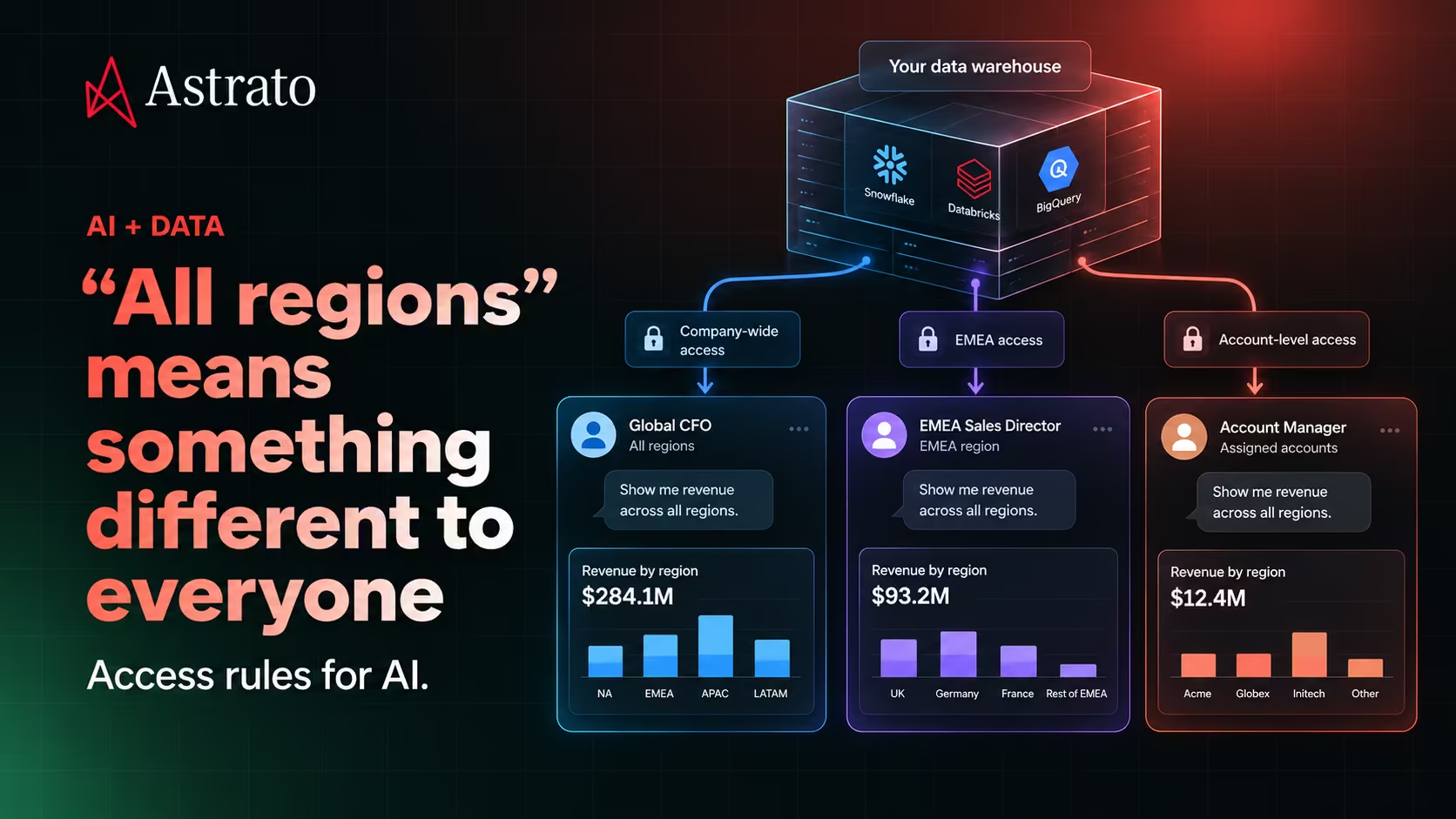
- For a global CFO, it might mean every market the company operates in.
- For an EMEA sales director, it might mean every country within their territory.
- For a regional account manager, it might mean only the accounts they're responsible for.
- And for an external partner, it might mean a much smaller subset of data they're contractually allowed to see.
Same question. Same warehouse. Same revenue definition.
Four different answers could be correct.
The difference isn't in the calculation. It's in who is asking and what they're allowed to access.
As AI becomes another way for employees to query business data and build applications, that distinction becomes increasingly important.
AI can understand the question without knowing who should see the answer
Traditional business applications usually come with some understanding of the person using them.
An employee signs in. Their identity is associated with a role, team or organization. The application uses that context to determine what they can see and do.
A regional sales manager might have access to their territory's pipeline. A finance executive might have company-wide visibility. An external customer might only see information belonging to their own organization.
The same data can support all three experiences because access rules determine which records and fields are available to each user.
Now introduce an AI assistant.
Someone asks:
“Which regions missed their revenue targets last quarter?”
The assistant may know which tables contain regional revenue and targets. It may even know the correct business definition of revenue.
But if it queries those tables without applying the user's access restrictions, it could return information the user was never supposed to see.
The SQL could be valid. The numbers could be accurate.
The answer could still be inappropriate for the person receiving it.
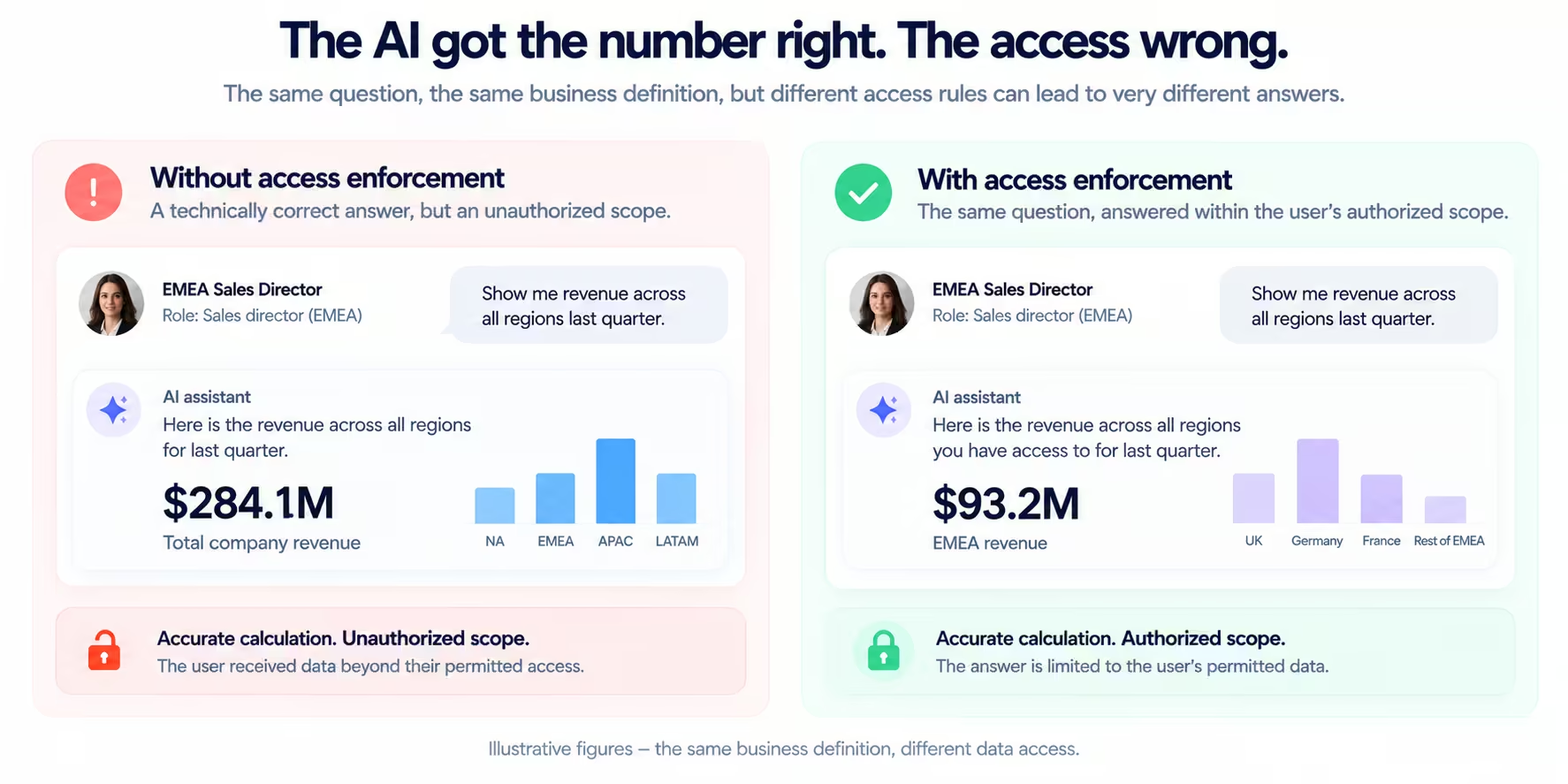
This is a different problem from AI hallucination or inconsistent metric definitions. It's an authorization problem.
And a convincing, well-formatted answer doesn't make it any less serious.
What “all regions” should mean depends on the user
Consider a company operating across North America, EMEA and APAC.
Three employees ask an AI assistant the same question:
“Show revenue for all regions last quarter.”
Assume they share the same approved revenue definition and the same reporting period.
Their authorized views might look like this:
The assistant shouldn't return company-wide data simply because the user included the word all.
Nor should it necessarily refuse the question. It can answer within the user's authorized scope, making that scope clear.
For example:
“Revenue across all regions you have access to was €8.4 million last quarter.”
That answer communicates something important: the result is scoped to the user.
The figures here are illustrative. The principle is what matters.
An AI assistant should interpret a business question within the boundaries of the user's permissions, rather than treating the wording of the prompt as permission to expand those boundaries.
Access control isn't just about hiding sensitive columns
When teams discuss data access, the conversation often starts with obvious examples.
Salary information. Personal identifiers. Customer contact details. Financial records.
Those are important, but access control goes beyond deciding whether someone can see a particular column.
There are several distinct questions an AI-enabled analytics experience needs to handle.
Which rows can this person see?
This is the territory, account or organizational boundary.
- A regional manager might be allowed to see all revenue records where the region is EMEA.
- A customer success manager might only see accounts assigned to their portfolio.
- An external customer might only see records belonging to their organization.
These restrictions are commonly implemented through row-level security, which limits which records are available to a user.
The important point is that the restriction should apply to the data retrieval itself.
Asking the AI to hide unauthorized rows after retrieving them is not an equivalent security control.
Which fields can this person see?
Two people may have access to the same customer records but different information within them.
An account manager might need account names, contract values and renewal dates.
They might not need bank account details, employee compensation information or other restricted fields.
Column-level controls, masking and related data permissions can determine which attributes are exposed.
This matters because AI assistants can answer questions in ways that don't resemble traditional reports.
A user might never explicitly request a restricted column. They could ask the assistant to summarize customer information, explain an account's profitability or identify unusual patterns.
The data made available to the AI still needs to respect field-level restrictions.
What can this person do with the data?
Reading information and changing information are different privileges.
An employee might be authorized to inspect forecast scenarios without being authorized to update approved targets.
A manager might be allowed to propose a pricing change but not approve it.
An AI-built application may eventually support actions as well as analysis, making these distinctions important.
An authorization model should account for the operations users can perform, not merely which information appears on their screens.
And permission to ask an AI assistant to perform an action is not the same as authorization to execute it.
Why prompt instructions aren't access controls
It's tempting to solve some of these problems by giving an AI assistant instructions.
For example:
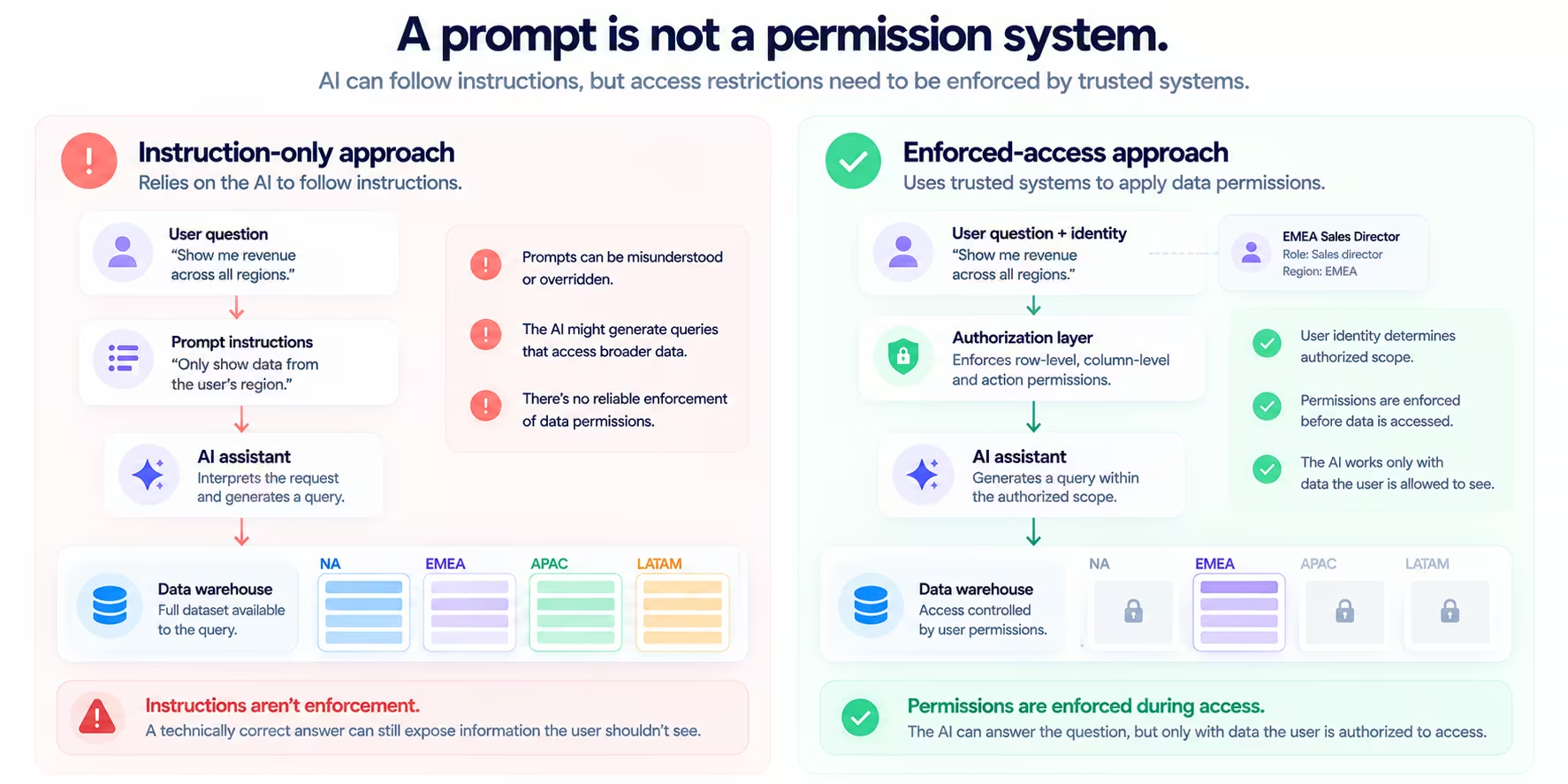
“Only show the user data from their assigned region.”
That may help the assistant understand the intended behavior. But it isn't a reliable enforcement mechanism on its own.
The assistant might misunderstand a request. The conversation might contain conflicting instructions. A user might ask for a comparison that crosses regional boundaries.
More importantly, a language model's interpretation of instructions shouldn't be the final authority on data permissions.
Access restrictions need to be enforced by trusted systems, not left to the assistant's discretion.
A safer architecture establishes the user's identity, determines their authorized scope and enforces the relevant permissions when data is accessed.
The AI can then work with the information it's permitted to retrieve.
That separation is important.
The assistant decides how to help answer a question.
The authorization system determines which information is available for that answer.
The AI shouldn't be able to expand those permissions simply because someone asks a more persuasive question.
The problem gets bigger when AI starts building apps
An AI assistant answering a question is one experience.
An AI-built business app introduces another layer.
Imagine a sales operations employee asks an AI app builder:
“Build an app that shows pipeline health across every region, highlights at-risk opportunities and lets managers explore individual deals.”
The request makes sense.
The resulting app might include a regional overview, pipeline charts, opportunity tables, filters and scenario analysis.
But who will use it?
The employee building the app might have company-wide access. The regional managers receiving it might not.
If the app simply uses the creator's access to retrieve data for everyone, sharing it could expose information beyond each recipient's permissions.
That creates a critical distinction:
Permission to build an app is not permission to share every underlying record with everyone who opens it.
An app built by a global sales operations analyst may need to behave differently when opened by an EMEA director or an APAC account manager.
The interface can remain the same.
The data each person is allowed to access may differ.
This is especially relevant as AI reduces the effort required to build and distribute business applications.
When creating an app takes weeks of development, security reviews and implementation work, there are more opportunities to identify access requirements before release.
When someone can build an app much faster, those requirements don't disappear.
They need to be built into the architecture supporting the experience.
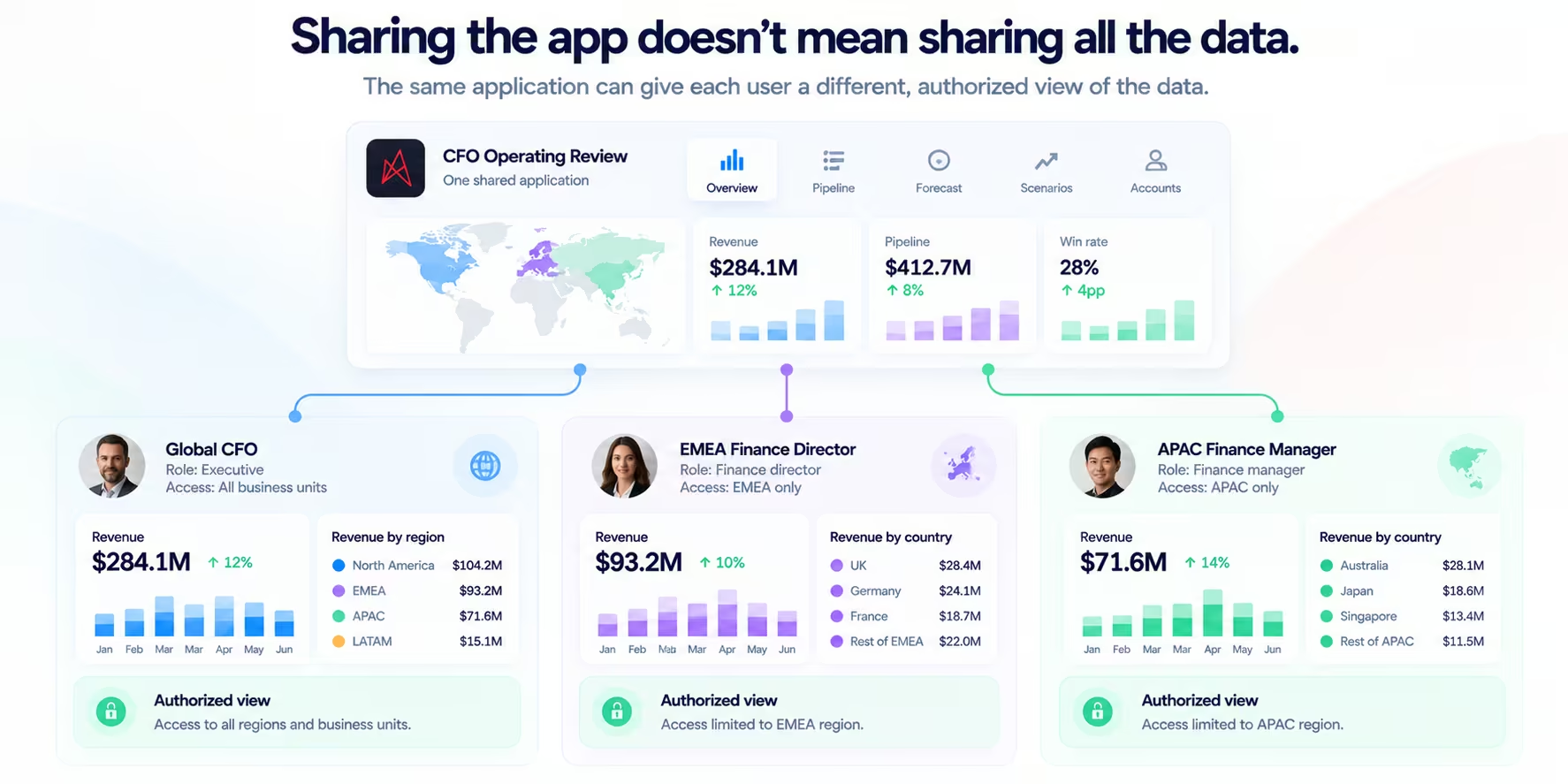
Sharing an app and sharing data are not the same thing
Suppose a CFO builds an operating review app.
It includes revenue performance, regional comparisons, margin trends and forecasts.
The CFO shares it with regional finance leaders.
There are two separate questions:
Can the recipient open the app?
And:
What data can the recipient access through it?
The first is about access to the application.
The second is about access to the underlying information.
An app-sharing permission doesn't automatically answer the second question.
For example, a finance leader might be allowed to use the operating review app while seeing only the business units they oversee.
The app's charts, filters, calculations and AI-powered questions should operate within those boundaries.
This also applies to less obvious ways of exposing information.
A regional restriction shouldn't be bypassed through a drill-down, an exported dataset, an AI-generated summary or an underlying query that uses broader privileges.
Every path to the data needs to respect the relevant authorization rules.
AI needs business definitions and access rules
In our earlier article, Why Two AI Tools Give You Two Revenue Numbers, we explored how different interpretations of revenue can produce conflicting answers from the same warehouse.
One AI might use order date. Another might use payment date. One might subtract refunds, while another excludes refunded orders entirely.
The lesson was that access to raw data doesn't automatically give AI the business meaning needed to answer correctly.
Access rules add another dimension.
Even when two AI assistants use exactly the same approved revenue definition, they shouldn't necessarily return the same result to every person.
A reliable answer depends on at least three things:
1. The business question. What is the user actually asking?
2. The business definition. How does the organization define and calculate the requested metric?
3. The user's authorized scope. Which records and fields may this person access?
These aren't interchangeable.
A semantic definition can tell an AI system how to calculate revenue. It doesn't automatically establish who is allowed to see every revenue record.
Likewise, access controls can restrict the available records without guaranteeing that the AI calculates revenue according to the company's approved definition.
Both need to work together.
A fourth consideration becomes important when AI can take action: whether the user is authorized to perform the requested operation.
Build on the permissions your organization already has
Companies don't need to invent a separate set of access rules for every AI interface.
Many already manage identities, roles, policies and data permissions through their existing infrastructure.
That might include their cloud data warehouse, identity provider, application layer and other governance systems.
The challenge is ensuring that AI-powered experiences use those controls correctly.
For an AI app builder working on warehouse data, that means understanding how identity and authorization are handled across the entire path from the user to the data.
A useful set of questions is:
- Whose identity is used when the app queries the warehouse?
- Where are row-level and column-level restrictions enforced?
- Can a shared app expose data available to its creator but not its recipient?
- Do AI-generated queries follow the same restrictions as ordinary queries?
- What happens when someone's role or permissions change?
- Can exports, summaries or app actions bypass restrictions?
The answers depend on the product's architecture and configuration.
For example, a system that queries through a shared service account needs a reliable way to enforce each end user's permissions. It cannot assume the warehouse automatically knows which person is using the app.
Similarly, using warehouse-native policies can be valuable, but only if the application's query and identity model allows those policies to enforce the intended user-level restrictions.
The goal is to preserve the organization's existing authorization decisions as data moves into new experiences.
Governed AI doesn't mean everyone gets the same answer
There's a subtle but important distinction between consistency and uniformity.
Organizations want AI assistants and business apps to use consistent definitions.
Revenue should mean revenue.
Pipeline should mean pipeline.
An active customer shouldn't change definition depending on which interface someone happens to use.
But consistency doesn't mean every user should receive an identical dataset.
A global CFO and a regional manager can use the same metric definition while seeing different authorized portions of the business.
Both results can be correct.
In fact, forcing them to see the same information might be the problem.
The goal is the same business meaning, applied to the data each person is authorized to access.
That principle becomes more important as organizations introduce multiple AI assistants, embedded analytics experiences and purpose-built apps.
The interfaces can vary. The questions can vary. The users can vary.
The underlying business definitions and authorization rules need to remain dependable.
Where Astrato fits
Astrato's approach to AI-built business apps starts with the data organizations already have in their cloud warehouses.
Rather than requiring teams to move their data into another analytics store, Astrato works with live warehouse data and governed business definitions.
This matters because the value of a new business app shouldn't depend on creating another isolated version of the organization's data or metrics.
But access governance also needs to be part of the conversation.
When evaluating any AI app builder, teams should verify how its authentication, warehouse connections, data permissions and app-sharing model work together.
The important question isn't simply whether an app can display a regional revenue chart.
It's whether the right people can use that app without gaining access to information they shouldn't see.
That's the standard AI-built business experiences need to meet.
The right answer for the right person
Return to the original question:
“Show me revenue across all regions.”
For one person, the right answer may include the entire company.
For another, it may cover only EMEA.
For someone else, it may include a handful of assigned accounts.
An AI assistant shouldn't have to guess which interpretation is authorized. And users shouldn't be able to expand their access simply by changing the wording of their prompts.
As AI becomes a more common interface to business data, accuracy and access control need to work together.
The numbers should follow the same trusted definitions.
The data should remain within the user's authorized scope.
And building another app shouldn't mean rebuilding the rules that protect it.
Your data. Any business app.
Ready to experience next-gen analytics?
See how Astrato runs natively in your warehouse.