Claude for analytics: what it does well, and what it needs from you
Explore what Claude does well in data analytics, from SQL to insights, and why trusted business definitions, live data and access controls matter.

You have a question about your business.
Revenue is growing, but margins are shrinking. Customer churn has increased in one segment. Your sales forecast looks healthy, but several large deals have slipped.
You could open a dashboard, apply filters, compare periods and work through the numbers yourself.
Or you could ask Claude:
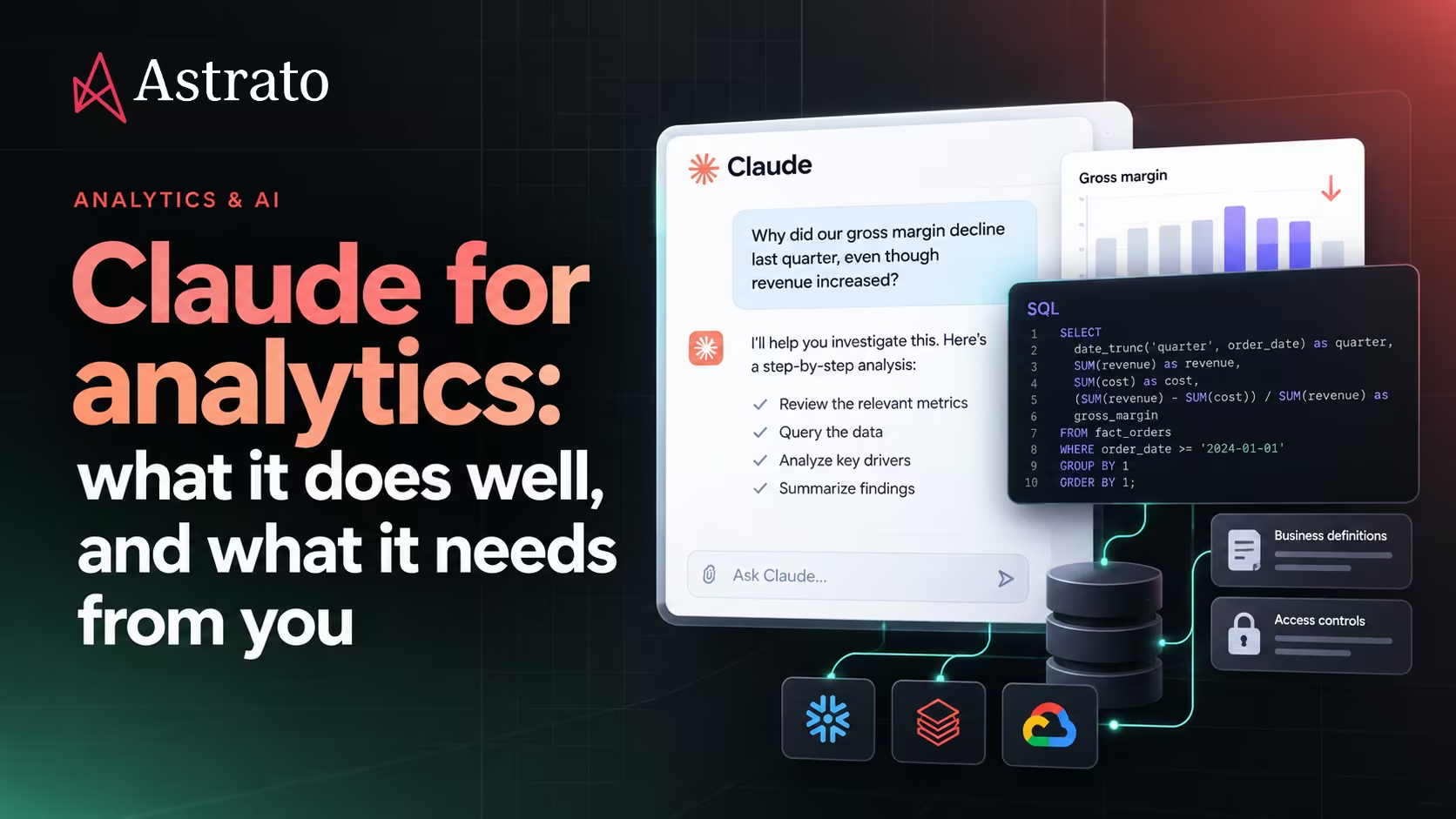
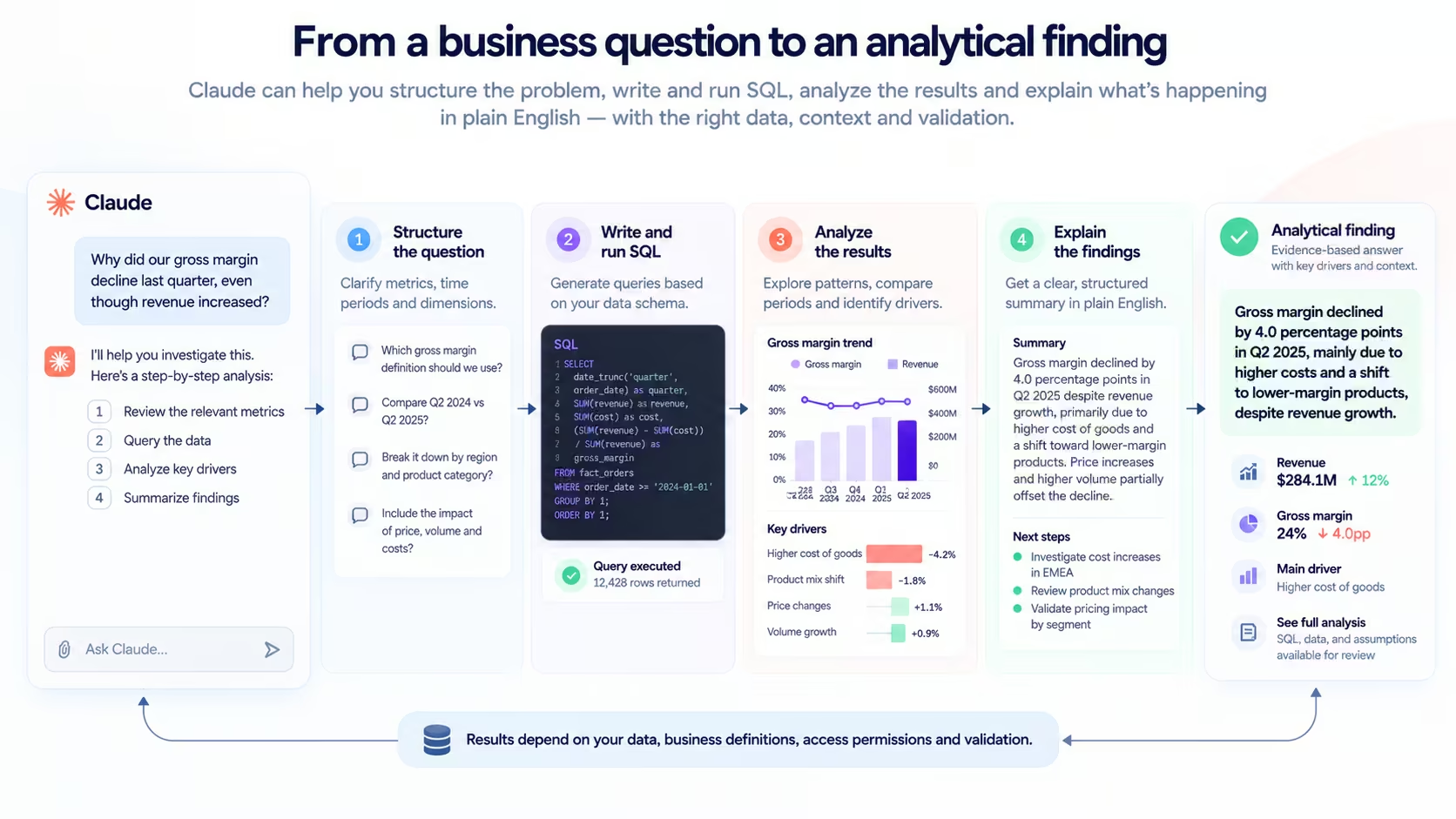
"Why did our gross margin decline last quarter, even though revenue increased?"
Claude can help you investigate that question. It can break down the problem, suggest which metrics to examine, write SQL, analyze results and explain potential drivers in plain English.
That's a meaningful change in how people can work with business data.
But there's a catch.
Claude doesn't automatically know how your company calculates gross margin, which revenue adjustments finance includes, which customers belong to each segment or which data you're authorized to access.
It can be very capable at analysis without having the business context needed to produce a reliable answer.
The opportunity isn't simply to give Claude more data.
It's to give Claude the right data, the right definitions and the right boundaries, so its analytical capabilities can be useful in your business.
What Claude does well in analytics
Claude is particularly useful when analytical work involves language, code, exploration and reasoning across multiple steps.
That makes it valuable for work that doesn't fit neatly into a predefined report.
1. Turning business questions into analytical steps
Business questions rarely arrive as perfectly specified queries.
A sales leader might ask:
"Why are we behind forecast in EMEA?"
Before anyone can answer, several things need to be established.
Which forecast? Which reporting period? Are we comparing committed revenue, weighted pipeline or another measure? Is the gap concentrated in particular countries, segments or opportunities?
Claude can help structure that investigation.
It can propose a sequence of questions, identify potentially relevant measures and suggest ways to isolate the drivers of a change.
For example, an investigation might progress from the overall forecast gap to regional performance, then to deal-stage movement, conversion rates and slipped opportunities.
This is useful because analytical work often begins with figuring out what to investigate, not with producing a chart.
But Claude's proposed investigation is still a hypothesis about how to approach the problem.
It needs your organization's definitions and data to establish what actually happened.
2. Writing and explaining SQL
One of Claude's practical strengths is working with code, including SQL.
Given a database schema and sufficient context, it can draft queries to aggregate revenue, compare periods, join tables, identify outliers or examine changes in performance.
It can also explain existing SQL.
That matters for teams where business users and analysts need to collaborate.
A finance manager may not know how to write a query using window functions or multiple joins. An analyst may be able to produce the query but still need to explain its assumptions to stakeholders.
Claude can help bridge that communication gap.
However, SQL that runs successfully isn't necessarily SQL that answers the business question correctly.
A query can use the wrong date field, duplicate values through an incorrect join or apply a calculation that differs from the company's approved metric.
Claude can write the syntax. It still needs the business rules that determine whether the logic is appropriate.
3. Exploring data and identifying patterns
Claude can help analyze datasets, including uploaded files and information made available through connected tools.
For example, you might provide a customer retention dataset and ask it to compare churn across segments, identify unusual changes or suggest further analyses.
It can help summarize distributions, examine relationships and organize findings into an understandable narrative.
This can be especially useful during exploratory analysis, when the objective is to discover which questions deserve closer attention.
But an apparent pattern isn't automatically an explanation.
If churn increased after a pricing change, that doesn't establish that the pricing change caused it.
Other factors might include customer mix, contract renewals, product issues or changes in how churn was measured.
Claude can help formulate and test hypotheses. The evidence still needs to support the conclusion.
4. Explaining findings to different audiences
An analysis is only useful if people understand what it means.
The same results may need to be communicated differently to a data analyst, a CFO and a regional sales manager.
Claude can help translate technical findings into business language, summarize a complex investigation or prepare a concise explanation for a management meeting.
For example, it can turn a detailed analysis of revenue movements into a narrative that distinguishes the overall trend, the main contributors and the questions still unresolved.
This doesn't replace validation.
An explanation that sounds convincing can still be based on incomplete data or unsupported assumptions.
The underlying calculations and evidence need to be checked before the findings become the basis for important decisions.
Where Claude's capabilities meet your company's reality
Imagine two organizations asking Claude the same question:
"What was our revenue last quarter?"
Both have well-structured data warehouses.
Both provide Claude with a way to query their data.
Yet the answer depends on information that isn't necessarily obvious from the database schema.
Does revenue mean invoiced revenue, recognized revenue or payments received?
Are refunds deducted?
Which exchange rates are used?
Does the quarter follow the calendar year or the company's fiscal calendar?
Should internal transactions be excluded?
And which business units is the person asking the question allowed to see?
Claude can generate a query based on the information it has.
If important context is missing, it may choose assumptions that seem reasonable but don't match how the business operates.
That isn't unique to Claude.
It's a broader challenge when AI systems are used to answer business questions.
The model can understand language and produce technically valid queries without knowing the organization's agreed interpretation of the data.
We've explored this in Why Two AI Tools Give You Two Revenue Numbers.
The important distinction is between being capable of analyzing data and being equipped to analyze your business correctly.
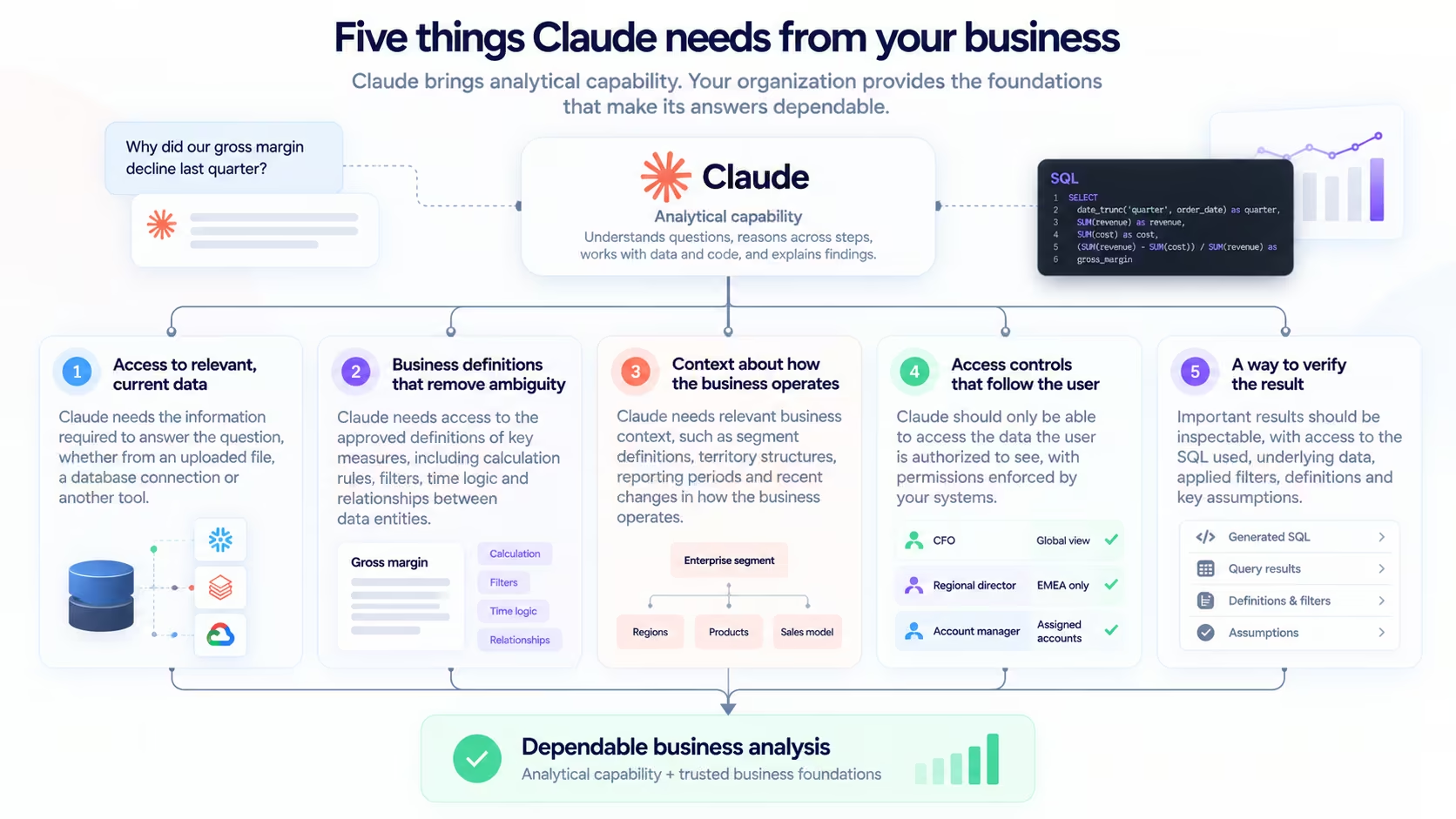
Five things Claude needs before it can become a dependable analytics assistant
Claude's analytical abilities are the starting point.
To use those abilities reliably with business data, organizations need to provide additional foundations.
1. Access to relevant, current data
Claude needs the information required to answer the question.
That might come from an uploaded CSV, a database connection, an API or another tool that makes data available.
For one-off analysis, a file can be enough.
A finance analyst might export a dataset, upload it and ask Claude to investigate an unexpected variance.
But recurring business analysis introduces a different requirement.
If the underlying numbers change every day, a static export can quickly become outdated.
The analyst then has to repeat the export, check whether the file contains the latest information and make sure the analysis still uses the correct dataset.
For questions that depend on current business performance, access to live or appropriately refreshed data becomes more useful.
That doesn't mean every analytical question requires a live warehouse connection.
It means the freshness of the data should match the decision being made.
2. Business definitions that remove ambiguity
Giving Claude access to the warehouse doesn't automatically tell it what the numbers mean.
Consider a table containing orders, payments, refunds and currencies.
The structure might be clear.
The business definition of net revenue may not be.
Claude needs access to the approved definitions of measures such as revenue, ARR, churn, active customers and pipeline coverage.
It also needs the relevant calculation rules, filters, time logic and relationships between data entities.
These definitions may already exist in the organization's semantic layer or other governed data models.
The objective should be to reuse them rather than ask each AI assistant to independently reconstruct business logic from raw tables.
If finance has approved a particular definition of revenue, Claude should be able to work from that definition instead of inventing a new one.
3. Context about how the business operates
Metric definitions are necessary, but they aren't the entire story.
Imagine asking:
"Why did our enterprise segment underperform?"
Claude may need to understand how your organization defines enterprise customers, which territories sales teams own, how opportunities move through the pipeline and which reporting periods matter.
It might also need to know whether the company recently changed its segmentation rules or reorganized its sales territories.
Some of that context can be captured in structured definitions, descriptions and relationships.
Other information may come from documentation or explanations provided during the analysis.
The more relevant context Claude has, the less it needs to infer from table names, column labels or general business conventions.
And when essential context is missing, a dependable analytical workflow should surface the ambiguity rather than quietly proceed with an assumption.
4. Access controls that follow the user
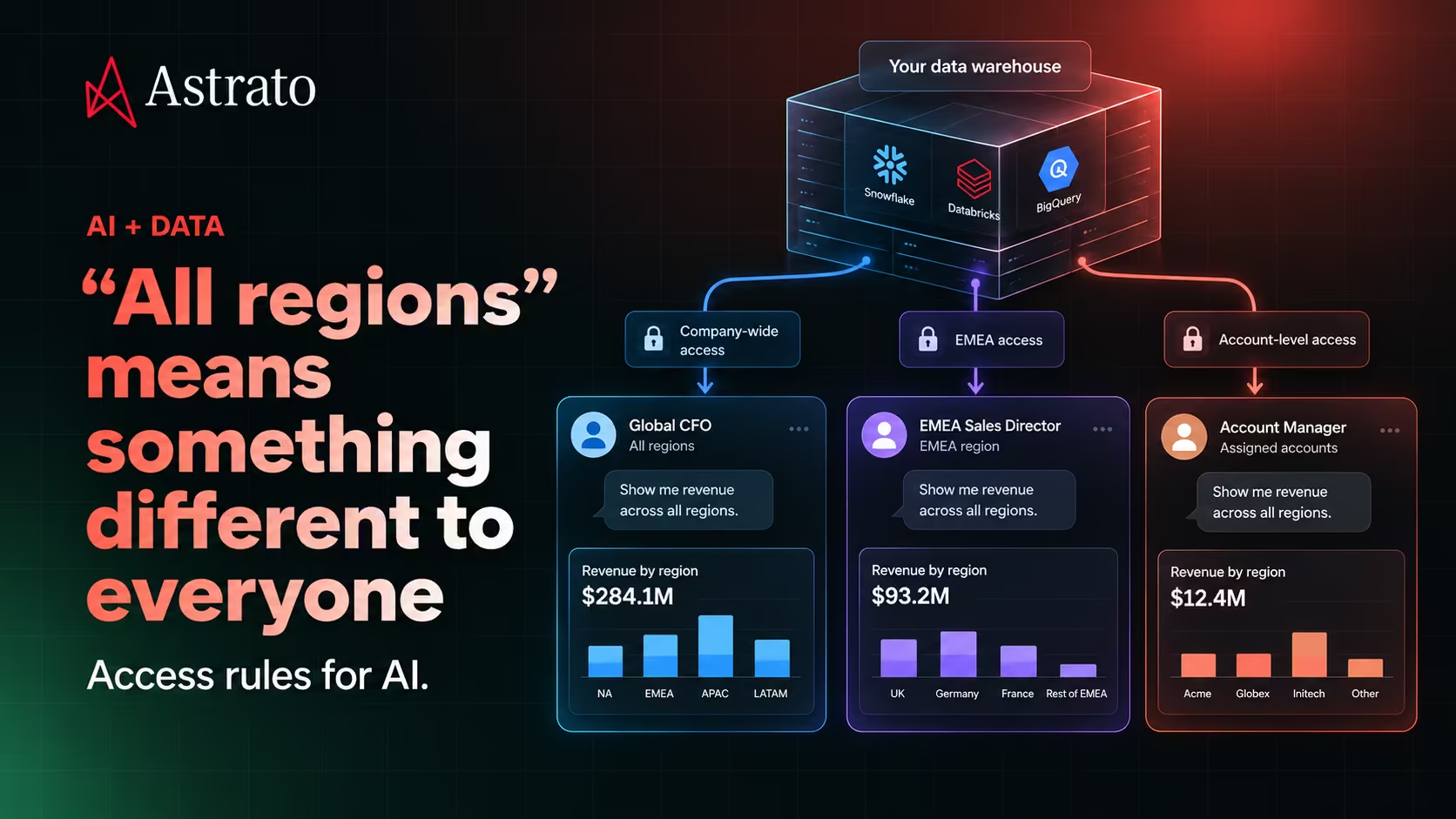
Not everyone should be able to ask Claude the same question and retrieve the same information.
A global CFO might be authorized to examine revenue across the entire organization.
A regional sales director might only have access to their territory.
An account manager might only be allowed to see assigned customers.
All three can ask:
"Show me revenue across all regions."
The correct result depends on their authorized data scope.
This is why instructions such as "only show the user permitted data" aren't sufficient security controls.
The systems connecting Claude to business data need to enforce the relevant permissions.
That may involve identity-aware access, warehouse policies, application authorization or a combination of controls.
The exact implementation matters.
We covered this distinction in our article on AI data access controls: accurate calculations don't make an answer appropriate if it exposes information the user isn't authorized to see.
5. A way to verify the result
Even with good data and definitions, important analytical results need validation.
Claude might produce an answer that looks reasonable but contains a query error, uses an inappropriate comparison or draws a conclusion that the evidence doesn't support.
For consequential decisions, users should be able to inspect the basis of the answer.
Depending on the workflow, that could include the SQL used, the underlying data, applied filters, metric definitions, query results and relevant assumptions.
For example, if Claude reports that gross margin declined by four percentage points, an analyst should be able to establish which periods were compared, how margin was calculated and which business segments contributed to the change.
The goal isn't to require every business user to become a SQL expert.
It's to make analytical results sufficiently transparent that they can be checked, challenged and trusted.
Claude with uploaded files versus connected warehouse data
There isn't one correct way to use Claude for analytics.
The right approach depends on the work.
A file-based workflow can be extremely useful.
If you have a well-prepared dataset and a specific question, uploading it may be the fastest way to start.
But if several departments want to use Claude to investigate current business performance every day, repeated manual exports become harder to manage.
At that point, the conversation moves beyond Claude's analytical capabilities.
It becomes a question of how Claude connects to the organization's data infrastructure and business definitions.
Where MCP fits into Claude analytics
One way to connect Claude to external systems is through the Model Context Protocol, or MCP.
MCP provides a standardized way for AI applications to interact with tools and data sources.
For analytics, an MCP-enabled integration might expose tools that allow Claude to discover available datasets, retrieve metadata, execute authorized queries or work with analytical resources.
The specific capabilities depend on the MCP server and the permissions granted to it.
MCP doesn't automatically make data governed, queries correct or access secure.
It's a connection mechanism.
The tools behind that connection still need appropriate authentication, authorization, business logic and validation.
That distinction matters because connecting Claude directly to raw database tables is different from connecting it to an analytical environment that exposes approved business definitions.
Both approaches may allow Claude to answer questions.
They don't necessarily provide the same consistency or controls.
You shouldn't have to choose between Claude and governed analytics
For many organizations, the natural response to AI adoption is to evaluate which assistant everyone should use.
But that may be the wrong starting point.
Some employees prefer Claude for exploring questions and working through complex problems.
Others prefer ChatGPT or a purpose-built analytical interface.
Finance teams may still want Excel.
Business leaders may prefer an application built around a recurring decision rather than a conversational interface.
Those preferences don't need to disappear.
What matters is whether the experiences work from consistent business definitions and respect the same underlying data permissions.
A useful architectural principle is to separate the AI experience from the business context underneath it.
The interface can change.
The approved definition of revenue shouldn't change with it.
Neither should the rules governing who can access the data.
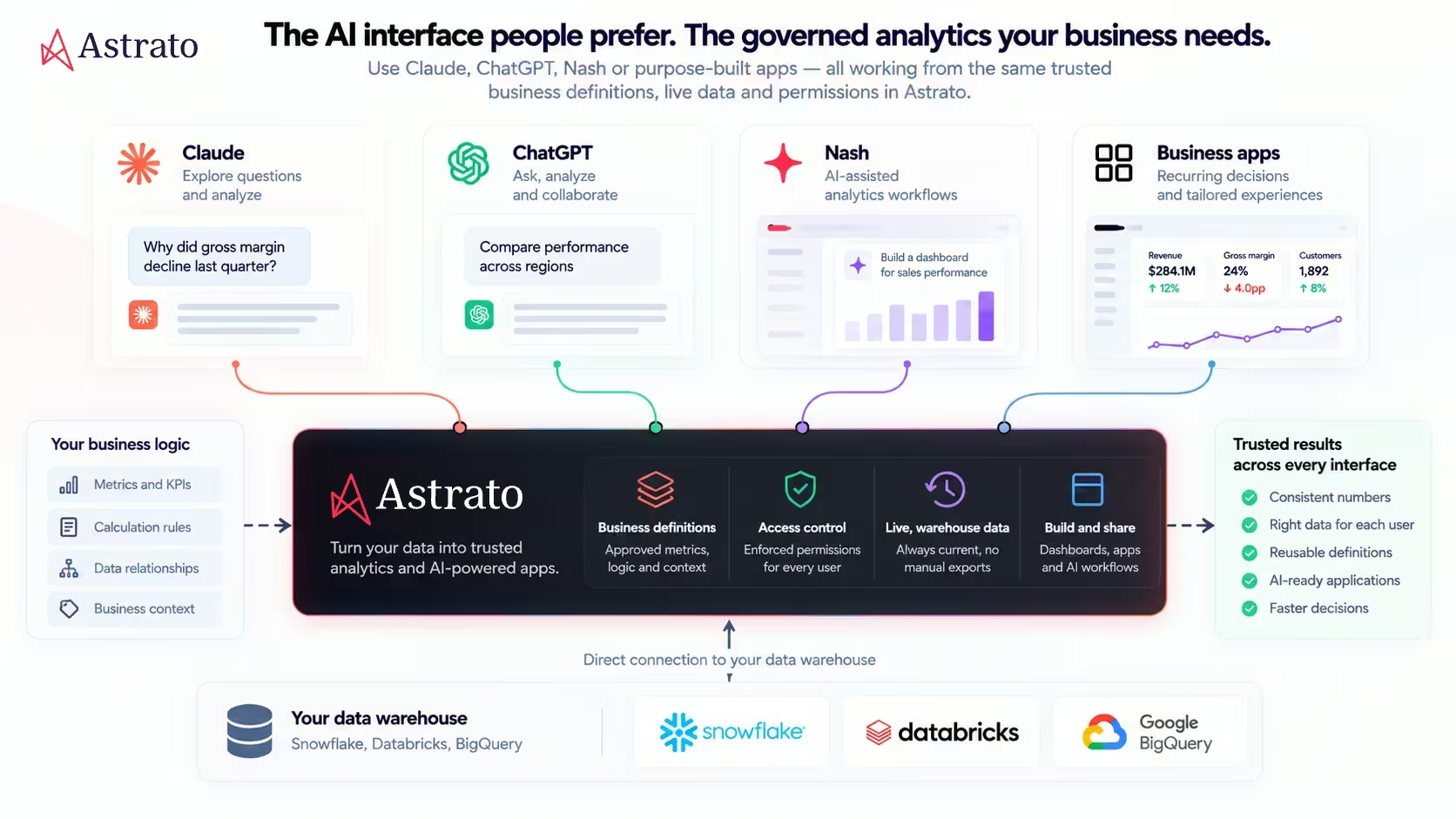
This gives organizations more flexibility to adopt new AI tools without rebuilding their analytical logic for every interface.
From an analytical question to a business application
There's another reason this distinction matters.
Some analytical questions are one-offs.
A CFO asks why margin declined last quarter, investigates the answer and moves on.
Others become recurring business processes.
A CRO reviews forecast risk every Monday.
A finance team compares operating scenarios every month.
A customer success leader regularly evaluates which accounts need intervention.
Claude can help explore these questions and define what information would be useful.
But if the same investigation happens repeatedly, a conversational exchange may not be the best permanent interface.
The workflow might benefit from a dedicated business app with the relevant metrics, filters, scenario inputs and decision steps already organized around the job.
That's not a limitation unique to Claude.
It's the distinction between using an AI assistant to investigate a question and building an experience around a repeatable business decision.
As we discussed in our article Dashboards or Apps? When a Weekly Decision Needs an App, the important question is what happens after someone sees the number.
Sometimes an answer is enough.
Sometimes the real work begins there.
Where Astrato fits
Astrato is an AI-native data app builder for warehouse data, designed to help teams build business applications on their existing cloud data platforms.
Its approach is relevant to organizations that want to make governed business data usable across different analytical experiences rather than create another isolated copy of their data.
Astrato works with platforms including Snowflake, Databricks and BigQuery, and supports AI-assisted analytical workflows through Nash.
Astrato's MCP capabilities also provide a route for connecting external AI tools, including Claude, to supported Astrato functionality.
The distinction is important: an MCP connection does not, by itself, guarantee that every semantic definition, permission or app-building operation is available through Claude. Those capabilities depend on the supported integration and configuration.
The broader opportunity is to let people work in the AI interface that suits them while making approved business definitions and live warehouse data reusable across experiences.
Claude can remain the interface for asking questions and exploring analytical problems.
Astrato can provide a complementary environment for building and sharing business apps around those problems.
The aim isn't to replace Claude with another chatbot.
It's to make AI-driven analysis more useful within the systems and rules the business already relies on.
Claude can help analyze your data. You need to supply the business meaning.
Claude is already capable of useful analytical work.
It can help structure investigations, write SQL, examine datasets and explain findings.
But analytical capability alone doesn't establish what revenue means in your company, which records a regional manager can see or whether a result matches the approved finance report.
Those are responsibilities of the systems, definitions and governance processes surrounding the AI.
The more organizations make that context available through reliable, controlled connections, the more useful AI assistants can become.
You don't necessarily need everyone to use the same AI interface.
You need the interfaces they choose to work from business information they can trust.
Your data. Any business app.
Ready to experience next-gen analytics?
See how Astrato runs natively in your warehouse.