BI Platforms with Native Row-Level Security on Snowflake
Three patterns of “native RLS” for Snowflake, mapped vendor by vendor — plus a 7-test POC checklist your data team can run in an afternoon.

You’ve already made the call. Row-level security belongs at the warehouse. Your Snowflake row access policies are written, tested, and protected by RBAC. The question now is which BI platform actually honors that decision — and which ones quietly ask you to recreate every policy a second time inside their semantic layer.
The honest answer is messier than vendor pages suggest. “Native RLS on Snowflake” means three different things in practice, and most BI tools only do the easiest one. This article maps each major platform onto a three-pattern spectrum, names the failure modes that show up when RLS lives in the wrong layer, and gives you a seven-test POC checklist your data team can run in an afternoon.
TL;DR
- “Native RLS” splits into three patterns: BI tools that maintain their own RLS, BI tools that inherit Snowflake row access policies through session context, and BI tools that do both inheritance plus semantic-layer filter pushdown for cost control.
- Pattern 2 is the architectural minimum for warehouse-native BI. Pattern 3 is what unlocks query cost predictability for multi-tenant workloads.
- Astrato and Sigma are the cleanest fits for Pattern 2 + 3. Tableau, Power BI, Looker, ThoughtSpot, and Metabase default to Pattern 1, with varying degrees of pass-through depending on configuration.
What “native RLS on Snowflake” actually means
Three patterns are hiding inside the same marketing phrase.
Pattern 1 — Parallel RLS
The BI tool maintains its own row-level security in a semantic model, dataset, or workbook. Snowflake’s row access policies are either bypassed (because the BI tool connects with one over-privileged service account) or duplicated (because the data team has to recreate the same policy logic in two places).
The cross-tenant safety of every dashboard depends on someone correctly configuring the BI tool’s RLS layer. Snowflake is doing nothing — its policy engine never evaluates against the actual end user.
This is the legacy default. It worked when BI tools were the only place row-level governance could live. With a modern data warehouse, it’s the architecture you’re trying to leave behind.
Pattern 2 — Inherited RLS
The BI tool issues queries under the requesting user’s identity, or propagates correct session context to a service account so Snowflake can resolve the right role. Snowflake’s row access policies evaluate against CURRENT_ROLE (or CURRENT_USER) of the actual person opening the dashboard.
Snowflake remains the single source of truth. Change a row access policy in the warehouse, and every dashboard reflects the change without rebuilding a semantic model. This is the architectural minimum that the term “warehouse-native” implies.
Pattern 3 — Inherited RLS + semantic-layer filter pushdown
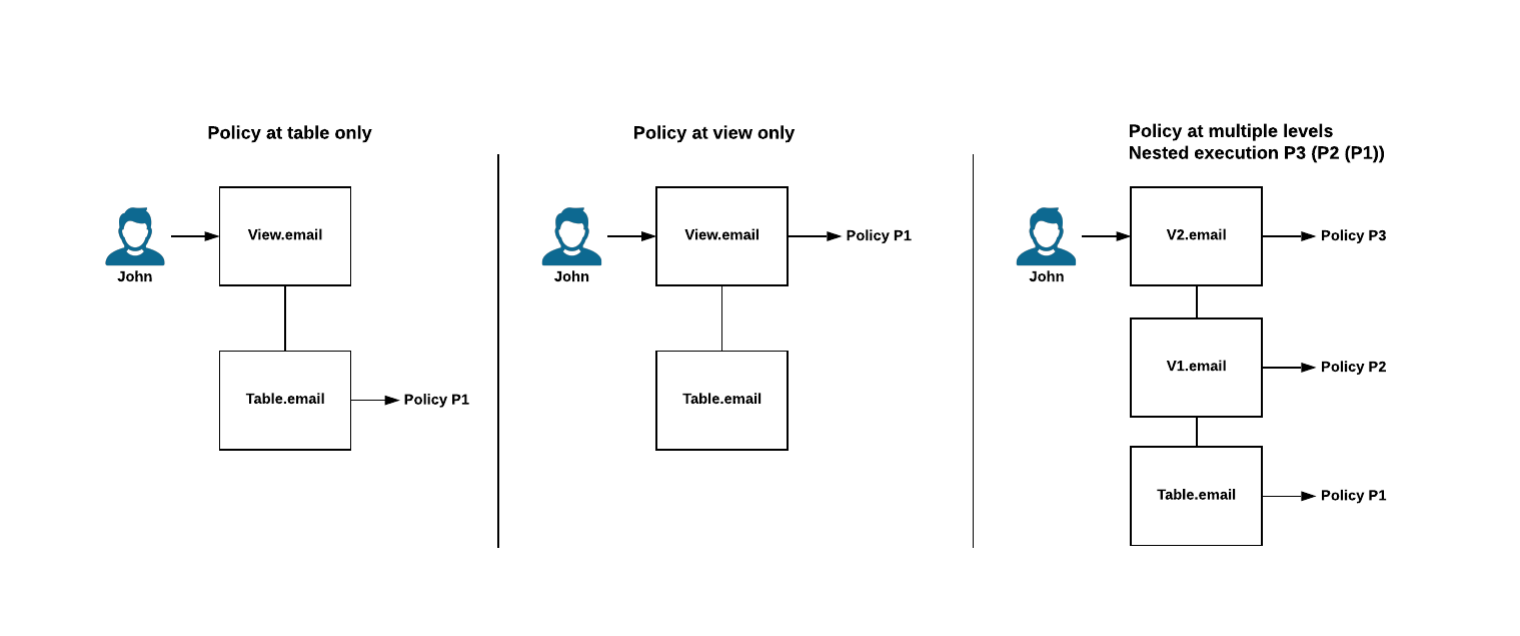
Pattern 2, plus the BI tool pushes its semantic-layer filters into the SQL it sends to Snowflake — so Snowflake computes only what’s needed and the result cache works at the warehouse level.
This is the pattern that turns RLS into a cost-control story. When a dashboard’s filters get pushed down alongside the row access policy, Snowflake scans fewer micro-partitions, finishes queries faster, and reuses cached results across users with overlapping permissions. When filters are evaluated client-side after fetching all rows the policy permits, you pay for compute you don’t use and lose the cache.
The third pattern is what the senior data engineer searching “BI tools that push down security filters from the data semantic layer to Snowflake for cost control” is actually asking about. Most vendor pages that claim “Snowflake RLS support” only mean Pattern 1.
Why this matters: three failure modes
When RLS lives in the wrong layer, three things break — and they break in production, not in the demo environment.
1. The cross-tenant data leak
A B2B SaaS product embeds dashboards for hundreds of customer accounts. The BI tool stores a parallel permission model keyed off a tenant_id user attribute. A semantic model gets edited, the wrong default value lands in a workbook copy, and a single misconfigured filter exposes Customer A’s revenue to Customer B. Snowflake’s row access policy was correct the whole time — it just wasn’t evaluating, because the BI tool’s service account had blanket access. Pattern 1 makes this class of leak a configuration error away. Pattern 2 makes it impossible at the data layer.
2. The audit gap
Your security team asks who queried a sensitive table last Tuesday. If the BI tool issues every query under one service account, Snowflake’s query_history shows nothing useful. You see the BI tool, not the user. Pattern 2 (with proper identity propagation via OAuth or per-user credentials) restores attributable audit trails — a hard requirement in regulated industries and a soft requirement for anyone running a SOC 2 audit.
3. The cost explosion from over-fetching
A dashboard with a “Region = West” filter applied client-side still asks Snowflake for every region the policy permits. A multi-tenant dashboard that filters by tenant_id after the result lands at the BI layer scans the entire tenant population in the warehouse on every refresh. The bill arrives at the end of the month. Pattern 3 — pushing semantic-layer filters into the query plan alongside the policy — is the difference between paying for the slice you use and paying for everything the policy lets through.
These failure modes aren’t theoretical. They’re the predictable consequences of leaving the security boundary at the BI layer when you’ve already chosen Snowflake as the place governance lives.
The semantic layer + filter pushdown pattern
Pattern 3 is worth a closer look because it’s the one most often misunderstood — and because it’s the one that turns a security architecture into a performance architecture.
A row access policy in Snowflake is itself a query rewrite. When you alter table sales add row access policy rap_region on (region), Snowflake injects the policy expression into the execution plan as a predicate. The query you wrote against sales becomes a query against a dynamic secure view, and the policy evaluates row-by-row at query time using CURRENT_ROLE or another context function.
A BI tool that respects this can do one of two things. It can fetch every row the policy permits and apply its own filters client-side — which works, but throws away the cost benefit of the warehouse. Or it can compile its semantic-layer filters into the SQL it sends Snowflake, so the policy and the dashboard filter end up in the same execution plan. Snowflake then prunes micro-partitions for both predicates together, and the result cache is shared across users whose policy + filter combination resolves to the same query.
The architectural pattern matches the “shift-left” approach that mature data teams already follow for transformation logic. As Chanade Hemming, Head of Data Products at IAG Loyalty, put it after migrating from Tableau:
The same logic that applies to metric definitions and transformation steps applies to security predicates. The closer your filters live to your policies, the less surface area you have to keep in sync. This is also the architectural foundation we cover in detail in our reference architecture for data products on Snowflake article, where Layer 4 (governance) is the layer that breaks first when BI tools maintain parallel models.
The POC checklist: 7 tests to verify any vendor’s RLS claims
These are the tests we’d run against any BI platform that claims to support Snowflake row-level security. They’re empirically verifiable and runnable in an afternoon. Sit with your data team, point each tool at the same Snowflake account, and run them.
These tests are what a data-platform-lead reader would design themselves. The point of putting them in print is to give you a defensible artifact you can share in a vendor evaluation conversation — and a structure for what “verify their claims” actually means.
The platforms that compete here
Each platform’s RLS-on-Snowflake behavior depends on configuration. Below is where each one defaults and where it can reach with effort.
Astrato — Pattern 2 + 3

Astrato is a warehouse-native BI platform built around live queries to Snowflake. There’s no extract layer, no parallel permission model, and no second RLS UI. A row access policy applied to a Snowflake base table flows through to every dashboard automatically — Astrato is the consumer of the policy, not the configurator. Semantic-layer filters compile into the SQL sent to Snowflake, so dashboard filters and policy predicates land in the same execution plan. The honest trade-off: Astrato deliberately doesn’t manage Snowflake RLS policies for you. The warehouse is the source of truth. If you want a BI tool that lets analysts define row-level rules in the BI layer, this is a positioning choice you should know about up front.
Best fit for: teams that have already chosen Snowflake as their governance boundary and want a BI layer that inherits cleanly. Strong fit for multi-tenant SaaS embedded analytics where per-customer policy enforcement happens at the warehouse.
Sigma — Pattern 2 + partial 3

Sigma respects Snowflake’s role-based access control, RLS, and OAuth — through OAuth passthrough or Sigma’s dynamic role-switching, the user’s identity or role is passed to Snowflake, and existing row-level and column-level security policies are inherited at query time.² Sigma also offers its own RLS layer using CurrentUserAttributeText, secure filters, and team-based attributes — useful when you need data filtering Snowflake doesn’t enforce, but the same pattern that creates the parallel-model risk if used without discipline. Filter pushdown depends on Sigma’s query compiler and the specific element.
Best fit for: teams that want Pattern 2 inheritance plus the option to layer Sigma-managed filters for analyst-driven exploration. The dual-pattern flexibility is a feature for some teams and a discipline problem for others.
Tableau — Pattern 1, with partial 2 reachable
Tableau’s native row-level security operates at the data source layer through user filters, calculated fields referencing USERNAME(), or data policies on virtual connections. Tableau Cloud also supports passing user attributes via JSON Web Token in embedding workflows.³ Inheriting Snowflake RLS requires DirectQuery (live connection) plus careful identity propagation — Initial SQL with Run As context is the classic pattern, though it’s configuration-heavy and easy to get wrong.
Best fit for: teams already deep in Tableau who can invest in the configuration to push toward Pattern 2. Less ideal for teams whose RLS strategy assumes the warehouse is the source of truth.
Power BI — Pattern 1, with partial 2 reachable
Power BI’s RLS lives in semantic models — roles defined in Power BI Desktop with DAX expressions, published with the model.⁴ When connecting to Snowflake via DirectQuery with Microsoft Entra SSO, each user’s Microsoft Entra credentials are passed through to Snowflake, so Snowflake’s row-level security applies per user and audit logs show actual user identities.⁵ This is real Pattern 2 inheritance, but it requires DirectQuery (not Import mode), Entra SSO configuration across three admin teams, and accepts the per-query cost profile of live querying.
Best fit for: organizations standardized on Power BI and Microsoft Entra ID who can absorb the DirectQuery cost profile. The Import-mode default ships you to Pattern 1.
Looker — Pattern 1, with Pattern 2 reachable
Looker’s primary RLS mechanism is the access_filter parameter combined with user attributes — a WHERE clause is automatically injected into queries based on the current user’s attribute values.⁶ This is Pattern 1: the filter is generated by Looker, not by Snowflake’s policy engine. Pattern 2 is reachable by passing user attributes through to Snowflake (via secure views referencing CURRENT_USER()) or by using OAuth integration so each user’s queries run under their own Snowflake user. Both work, both require deliberate setup, and both still leave LookML as a place where filter logic can drift from Snowflake’s policies.
Best fit for: teams already invested in LookML who treat the access filter pattern as authoritative. Less ideal for teams who want Snowflake’s policies to be the only place row-level rules exist.
ThoughtSpot — Pattern 1, with partial 2
ThoughtSpot implements RLS through user groups and a rules language defined inside the platform. A “passthrough security” mode exists, but ThoughtSpot’s own documentation notes that search suggestions may not fall under row-level security in this mode, because the search index gets built on the user who created the connection.⁷ That’s a real caveat for any team relying on Snowflake RLS as the only defense.
Best fit for: teams using ThoughtSpot for search-driven analytics where the group-based RLS model fits their permission structure. Verify Test 6 carefully if Pattern 2 inheritance is required.
Metabase — Pattern 1
Metabase’s row-level security lives in the BI tool through sandboxing — restricted views of data scoped per user group. There’s no native inheritance of Snowflake row access policies in the way the higher-end platforms describe. For internal use cases on smaller teams, this is often fine; for regulated multi-tenant scenarios where Snowflake is your governance boundary, it’s a structural mismatch.
Best fit for: internal analytics on teams that haven’t invested heavily in warehouse-side RLS, or teams who explicitly want governance inside the BI tool.
How to choose based on your governance posture
Three short rubrics, in order of how much your warehouse is already doing.
If your data team treats Snowflake as the single source of truth for governance — row access policies are written, tested, version-controlled, and owned by the data platform — you want a BI tool that inherits cleanly without asking you to recreate work. That’s Pattern 2 minimum. Astrato and a correctly-configured Sigma are the cleanest fits.
If you have Snowflake RLS in place but accept that some BI-layer filtering is acceptable — your team is mid-migration, or some dashboards have analyst-defined rules that don’t belong in Snowflake — Pattern 2 + 3 still wins, but the dual-pattern flexibility of Sigma or the DirectQuery-with-SSO path of Power BI are reasonable.
If your organization has heavy investment in a specific BI tool’s semantic model and re-platforming isn’t on the table — Tableau or Looker, primarily — Pattern 1 with a deliberate plan to push toward partial Pattern 2 is workable. Run Test 6 (audit attribution) carefully. Be honest about whether duplicated policies will stay in sync over a five-year horizon.
The decision isn’t which tool has the cleanest marketing page. It’s where you want the security boundary to live, and how much governance work you’re willing to do twice.
If your evaluation lands in Pattern 2 + 3 territory and you'd like to run the seven tests above against a live environment, book a demo with Astrato. We'll point an instance at your Snowflake and let the SQL speak for itself.
FAQ
What is row-level security on Snowflake?
Row-level security on Snowflake is enforced through row access policies — schema-level objects that determine which rows a query returns based on the querying user’s role, attributes, or session context. The policy is bound to a table or view via alter table ... add row access policy, and Snowflake evaluates it at query runtime against context functions like CURRENT_ROLE or IS_ROLE_IN_SESSION.
Which BI tools support Snowflake row access policies natively?
Astrato and Sigma offer the cleanest native inheritance — they pass user identity or session context to Snowflake so the warehouse’s policies apply automatically. Power BI and Looker can reach similar behavior with DirectQuery + SSO and per-user OAuth respectively. Tableau, ThoughtSpot, and Metabase default to maintaining their own RLS layer.
Does Power BI support Snowflake row-level security?
Yes, but only in DirectQuery mode with Microsoft Entra SSO enabled. In this configuration, each user’s Microsoft Entra credentials are passed through to Snowflake, so Snowflake’s row access policies apply per user. Import mode breaks this — the data is pulled at refresh time by a single account, so per-user RLS can’t propagate.
Can Tableau inherit Snowflake row access policies?
Tableau’s primary RLS lives in workbooks, data sources, and virtual connections — that’s Pattern 1. Inheriting Snowflake RLS requires a live connection (not extract), plus identity propagation via Initial SQL or JWT user attributes for embedded scenarios. It’s reachable, but it’s configuration the team has to maintain.
What’s the difference between RLS in the BI tool and RLS in Snowflake?
RLS in the BI tool means the BI platform stores its own permission model, evaluates it in its own runtime, and queries Snowflake with an over-privileged service account. RLS in Snowflake means the row access policy is evaluated by Snowflake’s query engine using the actual user’s session context, and the BI tool inherits the result. The difference matters for audit attribution, cost (filter pushdown), and the maintenance burden of duplicated governance.
Ready to experience next-gen analytics?
See how Astrato runs natively in your warehouse.